> For the complete documentation index, see [llms.txt](https://help.bioinsight.illumina.com/llms.txt). Markdown versions of documentation pages are available by appending `.md` to page URLs; this page is available as [Markdown](https://help.bioinsight.illumina.com/illumina-trupath-genome/data-visualizations-and-analysis/visualize-data-in-platform-core/visualizing-mrjd-results.md).
# Visualizing MRJD Results
Use the MRJD tab in Genome Viewer on Platform Core to review Multi-Region Joint Detection results to provide joint copy number and haplotype-resolved variant views for each paralog set.
### Visualize MRJD Data in Platform Core
Use the MRJD Viewer on Platform Core to review [Multi-Region Joint Detection](https://help.dragen.illumina.com/dragen-v4.6/product-guides/dragen-v4.6/dragen-trupath-pipeline#multi-region-joint-detection) results — joint copy number and haplotype-resolved variant views for each paralog set. This viewer is available on TruPath-enabled DRAGEN Germline 4.6 pipelines or later.
{% hint style="info" %}
**What MRJD Viewer Shows:**
The MRJD Viewer tab provides an overview of which paralog sets that were analyzed, the joint copy number for each set, and which copy carries which alleles. For read-level evidence from the multi-column VCF, phased BAM, and reference-region alignments, see [Visualize Data in IGV.](/illumina-trupath-genome/data-visualizations-and-analysis/visualize-data-in-igv.md)
{% endhint %}
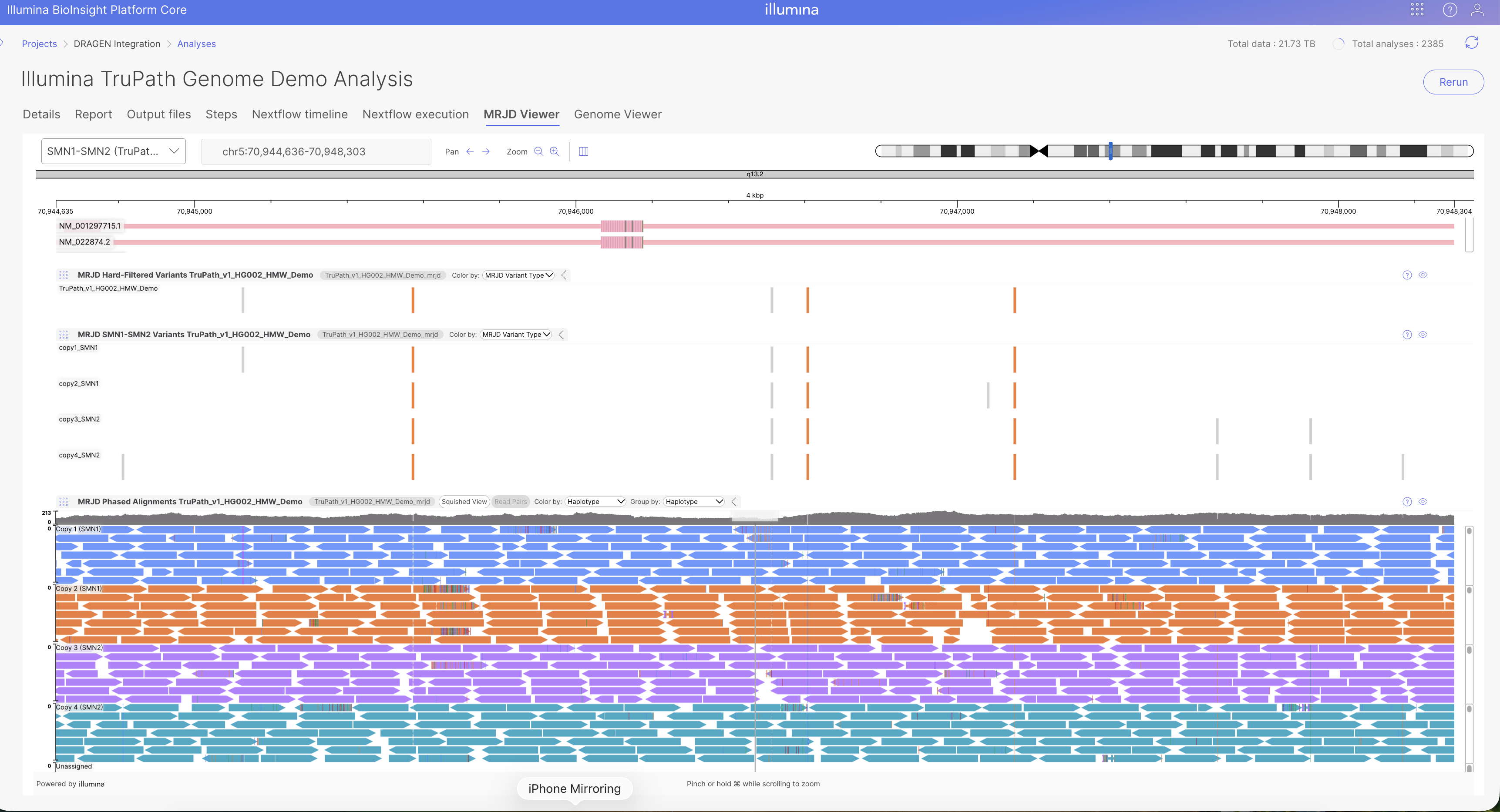
Open the completed DRAGEN Germline Analysis in Platform Core. If MRJD calling was enabled and successfully completed in the pipeline, a separate "MRJD Viewer" tab will appear next to the Genome Viewer tab. Choose a paralog set from the dropdown on the upper left (for example, SMN1-SMN2).
### What You See
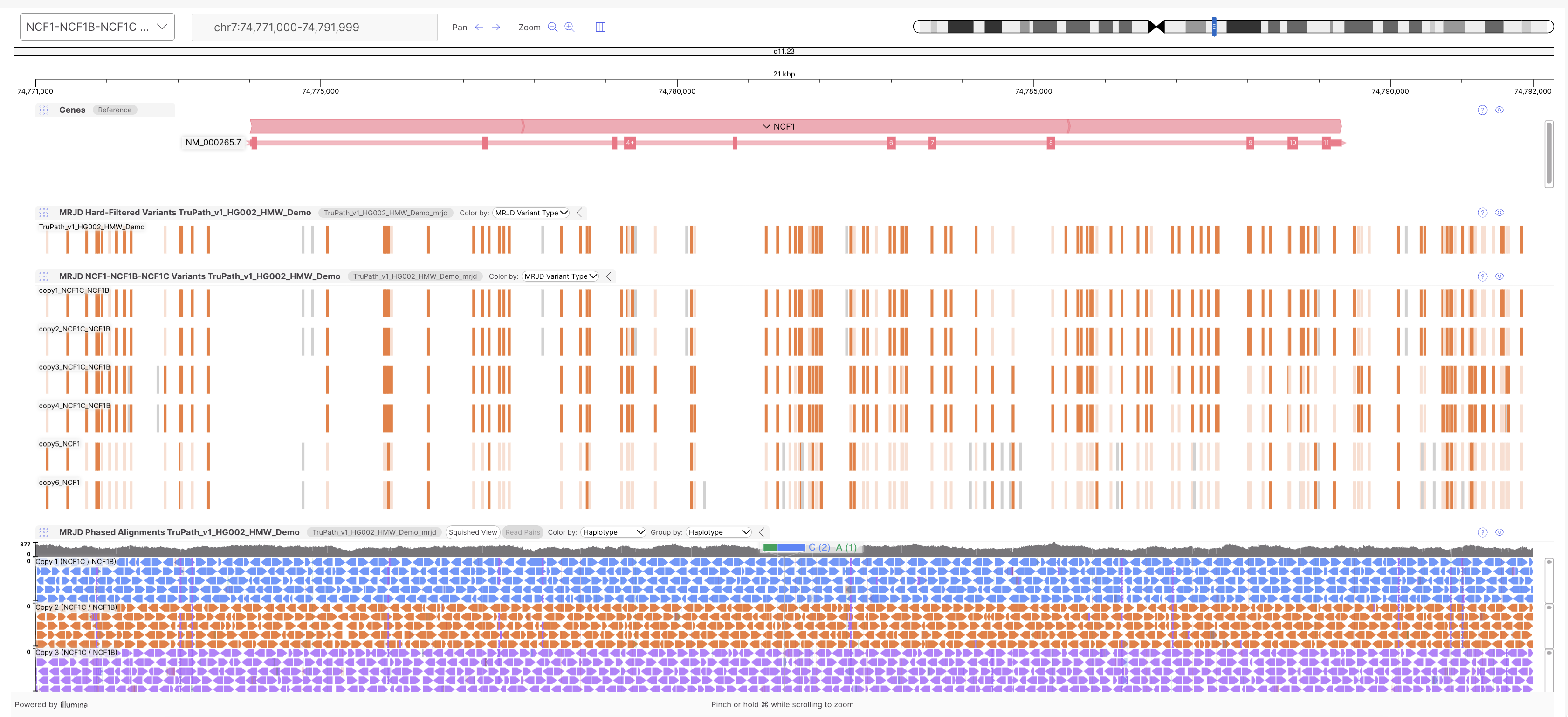
* **Reference:** Reference sequence for the viewed interval. Orient coordinates and bases as you zoom.
* **Gene:** Gene models / transcripts (for example, RefSeq). Place variants relative to exons and gene structure.
* **Hard-Filtered VCF Track:** MRJD Hard-Filtered small-variant calls for the locus (.mrjd.hard-filtered.vcf.gz). Summary variant track across the region.
* **Paralog Set VCF:** Per-copy phased MRJD calls for the selected set (for example, SMN1–SMN2). One row per reconstructed copy, indicating which alleles sit on which copy.
* **BAM:** MRJD phased alignments (.mrjd.phased.bam). Squished; color and group by haplotype/copy. Confirm read support for alleles in the paralog set VCF.
### Color Legend (Variant Sites)
| Color | Meaning |
| ------------ | ------------------------------------------ |
| Dark Orange | ALT allele at a reference-difference site |
| Light Orange | REF allele at a reference-difference site |
| Gray | Variant at a non–reference-difference site |
### Reading the BAM track
The BAM Track provides reads separate by haplotypes by default, with mismatches located along the read sites for confirmation along the variant tracks. Other options such as using the squished view, group by, and color by may be used.\
\
At a site in the paralog set VCF, check that the matching BAM group supports the same allele. Use coverage above the pileup before trusting sparse reads. Unassigned reads may sit in their own group.
---
# Agent Instructions
This documentation is published with GitBook. GitBook is the documentation platform designed so that both humans and AI agents can read, navigate, and reason over technical content effectively. Learn more at gitbook.com.
## Querying This Documentation
If you need additional information that is not directly available in this page, you can query the documentation by asking a question.
Perform an HTTP GET request on the following URL with the `ask` and `goal` query parameters:
```
GET https://help.bioinsight.illumina.com/illumina-trupath-genome/data-visualizations-and-analysis/visualize-data-in-platform-core/visualizing-mrjd-results.md?ask=&goal=
```
`ask` is the immediate question: it should be specific, self-contained, and written in natural language.
`goal` is what the user is ultimately trying to achieve, the reason they need the answer. Sharing it helps GitBook give you a better, more relevant answer. A goal is most helpful when it describes the outcome the user wants rather than restating the question. For example, with `ask=how do I create an API token`, a goal like `automate deployments from our CI pipeline` lets GitBook tailor the answer to that use case.
The response will contain a direct answer to the question and relevant excerpts and sources from the documentation.
Use this mechanism when the answer is not explicitly present in the current page, you need clarification or additional context, or you want to retrieve related documentation sections.