> For the complete documentation index, see [llms.txt](https://help.bioinsight.illumina.com/llms.txt). Markdown versions of documentation pages are available by appending `.md` to page URLs; this page is available as [Markdown](https://help.bioinsight.illumina.com/icm/analyses/analysis-functionality/task-menu/combine-multiomics-data/snf-similarity-network-fusion.md).
# SNF (Similarity Network Fusion)
Similarity network fusion (SNF) integrates sample-similarity networks from multiple assays into one fused network \[1]. For each assay, SNF creates a sample-similarity network, it then uses nonlinear diffusion to combine these networks. Spectral clustering partitions the fused network into sample subgroups.
Use normalized, quality-controlled data from each assay. PCA score nodes from normalized data also work.
All inputs must contain the same bulk samples. Inputs cannot contain missing values.
Each input must be a numeric sample-by-feature matrix. Log-transformed data is recommended because it stabilizes variance.
### Run SNF
1. Select an input data node.
2. Choose **Combine multiomics data → SNF**.
3. Click **Select data nodes**.
4. Select the input nodes for the other assays.
5. Click **Select** in the lower-right corner.
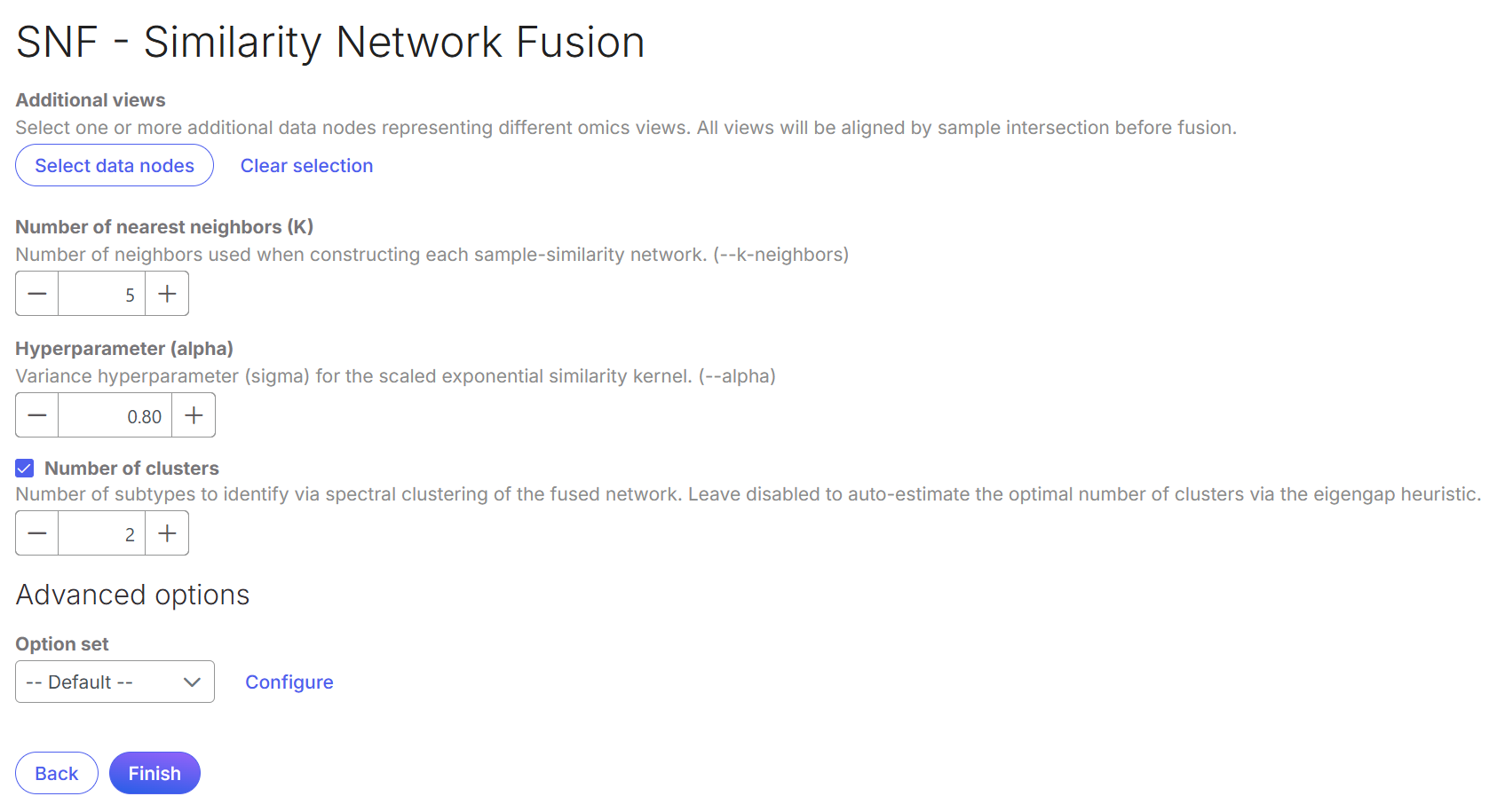
Click **Configure** under *Advanced options* to set fusion iterations and random seeds.
Set the parameters, then select **Finish**.
**Number of nearest neighbors**: Recommended range 10–30. Lower values are sensitive to noise and outliers. Higher values can merge distinct clusters.
**Hyperparameter alpha/sigma**: Recommended range 0.3–0.8. Lower values can fragment true clusters. Higher values can reduce cluster separation.
**Number of clusters**: Specify the number of fused-network groups. Leave this unchecked to estimate the optimal number using the eigengap heuristic.
**Fusion iteration (T)**: Controls cross-network diffusion rounds. Each round updates an assay network through the other networks. The networks progressively converge on one consensus. Use 10–50 iterations. Fewer iterations may produce incomplete fusion. More iterations increase runtime.
**Random seed:** use the same value for reproducible results.
### Outputs
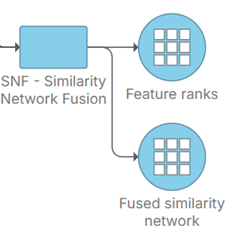
SNF creates two data nodes:
#### Fused similarity network
This node contains a sample-by-sample similarity matrix with values from 0 to 1. It also contains a spectral-clustering annotation for each sample.
Double-click the **Fused similarity network** node to view the matrix as a heatmap.
Use the spectral-clustering results for visualization or differential analysis within each assay. To do that, select the **Fused similarity network** node, then choose **Annotation/Metadata → Publish attributes to study**. See [Publish attributes to study](/icm/analyses/analysis-functionality/task-menu/annotation-metadata/publish-cell-attributes-to-project.md).
#### Feature ranks
This node lists features used in SNF, ranked by normalized mutual information (NMI). For each feature, SNF creates a single-feature clustering and compares it with the fused-network clustering. A high NMI score can indicate a potential biomarker.
Double-click the node to open its report. The columns show the assay name, feature name, and NMI score.
## Reference
1. Wang, B., Mezlini, A., Demir, F. *et al.* Similarity network fusion for aggregating data types on a genomic scale. *Nature Methods* 11, 333–337 (2014).
2.
---
# Agent Instructions
This documentation is published with GitBook. GitBook is the documentation platform designed so that both humans and AI agents can read, navigate, and reason over technical content effectively. Learn more at gitbook.com.
## Querying This Documentation
If you need additional information that is not directly available in this page, you can query the documentation by asking a question.
Perform an HTTP GET request on the following URL with the `ask` and `goal` query parameters:
```
GET https://help.bioinsight.illumina.com/icm/analyses/analysis-functionality/task-menu/combine-multiomics-data/snf-similarity-network-fusion.md?ask=&goal=
```
`ask` is the immediate question: it should be specific, self-contained, and written in natural language.
`goal` is what the user is ultimately trying to achieve, the reason they need the answer. Sharing it helps GitBook give you a better, more relevant answer. A goal is most helpful when it describes the outcome the user wants rather than restating the question. For example, with `ask=how do I create an API token`, a goal like `automate deployments from our CI pipeline` lets GitBook tailor the answer to that use case.
The response will contain a direct answer to the question and relevant excerpts and sources from the documentation.
Use this mechanism when the answer is not explicitly present in the current page, you need clarification or additional context, or you want to retrieve related documentation sections.