> For the complete documentation index, see [llms.txt](https://help.bioinsight.illumina.com/llms.txt). Markdown versions of documentation pages are available by appending `.md` to page URLs; this page is available as [Markdown](https://help.bioinsight.illumina.com/icm/analyses/analysis-functionality/task-menu/combine-multiomics-data/mofa-multiomics-factor-analysis.md).
# MOFA (multiomics Factor Analysis)
Integrate bulk multiomics data to identify shared and assay-specific sources of variation.
Multi-Omics Factor Analysis (MOFA) integrates two or more omics assays from the same study [1](#reference). It identifies latent factors that explain shared and assay-specific variation.
MOFA supports bulk sample-level data. Assays may have missing samples.
Use normalized, quality-controlled data from each assay. Each input must be a numeric sample-by-feature matrix. Log-transformed values are recommended.
### Run MOFA
1. Select an input data node.
2. Choose **Combine multiomics data → MOFA**.
3. Click **Select data nodes**.
4. Select the input nodes for the other assays.
5. Click **Select** in the lower-right corner.
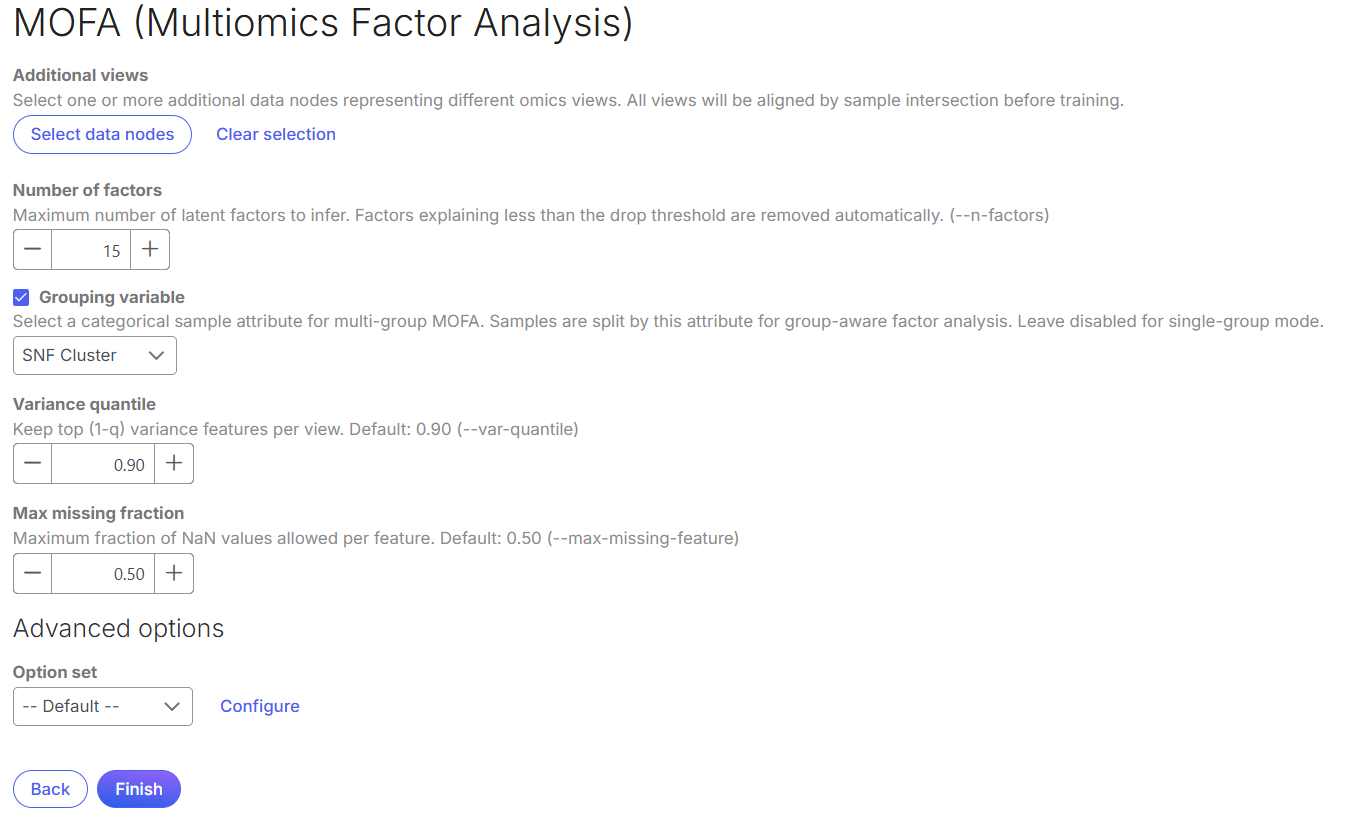
6. Set the parameters, then select **Finish**.
#### Parameters
**Number of factors**: Sets the initial number of latent factors. Use 5–25 factors. Too few factors can miss biological variation. Too many can capture noise.
**Grouping variable**: Selects a categorical sample attribute with two or more groups. MOFA decomposes variance by group and factor. Leave this unset for unbiased factor discovery.
**Variance quantile**: Retains highly variable features. Enter a value from 0 to 1. Use `0` to retain all features. Use `0.9` to retain the top 90% by variance.
**Max missing fraction**: Sets the maximum missing-value fraction allowed per feature. Enter a value from 0 to 1. For example, `0.5` removes features missing in over 50% of samples.
Click **Configure** under *Advanced options* to set additional parameters and the random seed.
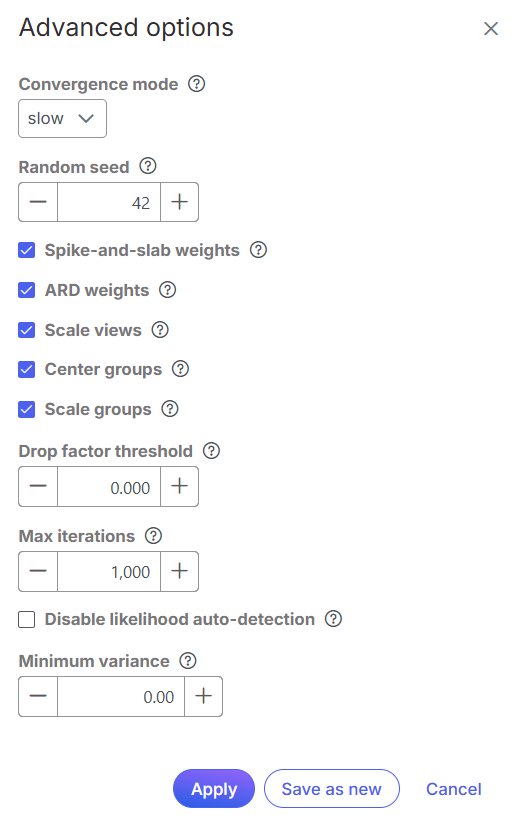
#### Advanced options
**Convergence mode**: Choose **Fast** for exploration, **Medium** for standard analysis, or **Slow** for the final model.
**Random seed**: Use the same value to reproduce results.
**Spike-and-slab weights**: When enabled, only a subset of features loads on each factor. This improves identification of driving features. When disabled, all features have nonzero loadings. The resulting weights are less interpretable.
**ARD weights**: Enables automatic relevance determination for factor weights in each assay. ARD shrinks weights toward zero when a factor is not relevant. Disable it to force every factor to remain active across assays.
**Scale views**: Scales each assay so its total feature variance equals 1. Enable this option to give assays equal influence. Disable it when higher-variance assays should contribute more. Assays with more features usually have higher total variance.
**Center groups**: Available when a grouping variable is set. Centers each feature within each group. This removes group-level mean differences and captures within-group variation. Disable this option only when group-level mean differences are relevant.
**Scale groups**: Available when a grouping variable is set. After centering, scales each group to unit variance. Enable this option to give groups equal influence. Disable it to favor groups with greater variance.
**Drop factor threshold**: Removes factors that explain less than the threshold in every assay. Set `0` to retain all factors. Use `0.001`–`0.05` to enable factor removal.
**Max iterations**: Sets the training-iteration limit. Use 100–5,000 iterations. Too few iterations can produce unreliable factors. More iterations increase runtime.
**Disable likelihood auto-detection**: Disables automatic likelihood selection based on data type. Specify the likelihood for each assay manually. Use this option when automatic detection selects an unsuitable distribution.
**Minimum variance**: Removes features with variance below the specified threshold.
### Outputs
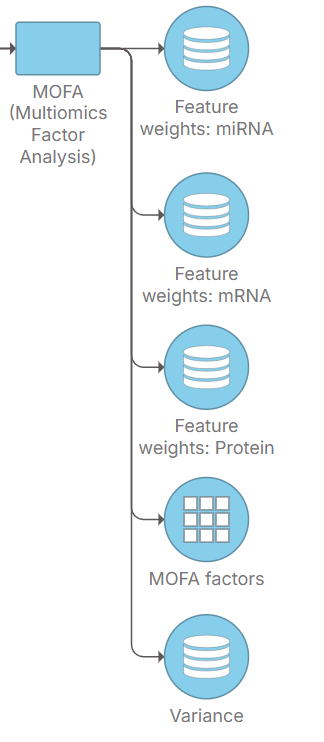
MOFA creates factor, variance, and feature-weight nodes for each input assay.
#### MOFA factors
This node contains a sample-by-factor matrix of latent factor values. Double-click the node to open a two- or three-dimensional sample scatter plot. The first two or three factors define the plot axes.
Use sample attributes to configure the plot.
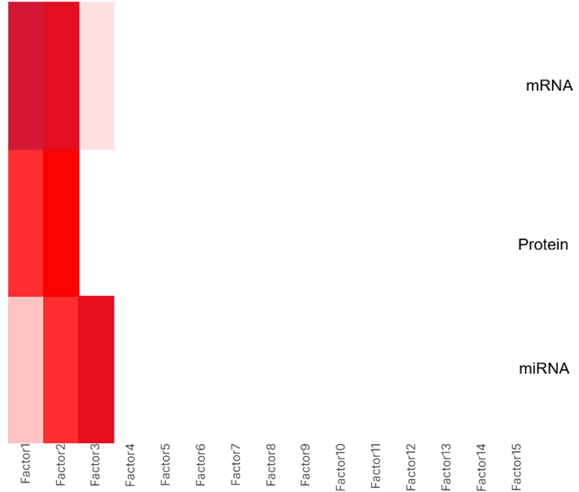
#### Variance
This node contains the proportion of variance explained by each factor in each assay. Values range from 0 to 1. Double-click the node to view the results as a heatmap.
If grouping variable is selected, the proprotion of the variance explained by each assay are reported on each subgroup respectively.
#### Feature weights
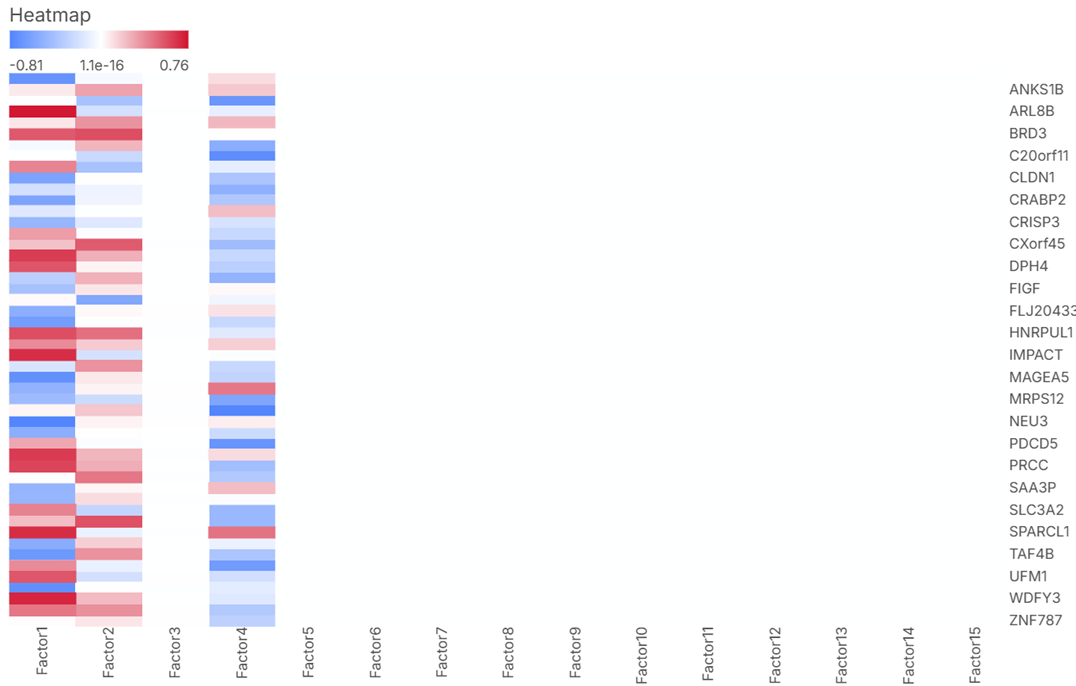
Each assay has a feature-weights node. It contains feature loadings for each factor. Use these values to identify features that drive factor variation.
When Spike-and-slab weights is enabled, most of the values are 0. If a value is greater than 0, it means the feature is positively associated with the factor; if a value is less than 0, it means the feature is negatively associated with the factor.
Double click on a data node to view the information in heatmap.
## Reference
1. Argelaguet R, Velten B, Arnol D, Dietrich S, Zenz T, Marioni JC, Buettner F, Huber W, Stegle O. Multi-Omics Factor Analysis — a framework for unsupervised integration of multi-omics data sets. *Molecular Systems Biology*. 2018;14(6):e8124.
2. [MOFA2 documentation](https://github.com/bioFAM/MOFA2/tree/master)
---
# Agent Instructions
This documentation is published with GitBook. GitBook is the documentation platform designed so that both humans and AI agents can read, navigate, and reason over technical content effectively. Learn more at gitbook.com.
## Querying This Documentation
If you need additional information that is not directly available in this page, you can query the documentation by asking a question.
Perform an HTTP GET request on the following URL with the `ask` and `goal` query parameters:
```
GET https://help.bioinsight.illumina.com/icm/analyses/analysis-functionality/task-menu/combine-multiomics-data/mofa-multiomics-factor-analysis.md?ask=&goal=
```
`ask` is the immediate question: it should be specific, self-contained, and written in natural language.
`goal` is what the user is ultimately trying to achieve, the reason they need the answer. Sharing it helps GitBook give you a better, more relevant answer. A goal is most helpful when it describes the outcome the user wants rather than restating the question. For example, with `ask=how do I create an API token`, a goal like `automate deployments from our CI pipeline` lets GitBook tailor the answer to that use case.
The response will contain a direct answer to the question and relevant excerpts and sources from the documentation.
Use this mechanism when the answer is not explicitly present in the current page, you need clarification or additional context, or you want to retrieve related documentation sections.