> For the complete documentation index, see [llms.txt](https://help.bioinsight.illumina.com/llms.txt). Markdown versions of documentation pages are available by appending `.md` to page URLs; this page is available as [Markdown](https://help.bioinsight.illumina.com/emedgene/emedgene-curate-manual/curate_variants/curate_variant_table.md).

# Curate Variant table

The **Curate Variant table** lists variants in your organization’s **Curate** database and variants shared by collaborators.

* **Local variants** are stored in your organization’s **Curate** database.
  * If collaborators have shared curations for your local variant, they will appear in the **Network summary card.** You cannot import these curations for an existing variant but you can copy shared information.
* **Network-only variants** are shared by collaborators but are not stored in your organization’s **Curate** database.
  * The **Variant page** for a network-only variant includes only the **Network summary card** and limited shared annotations. Select **Import** to add the variant to your database. Before import, its annotations do not appear in **Analyze**.

You can:

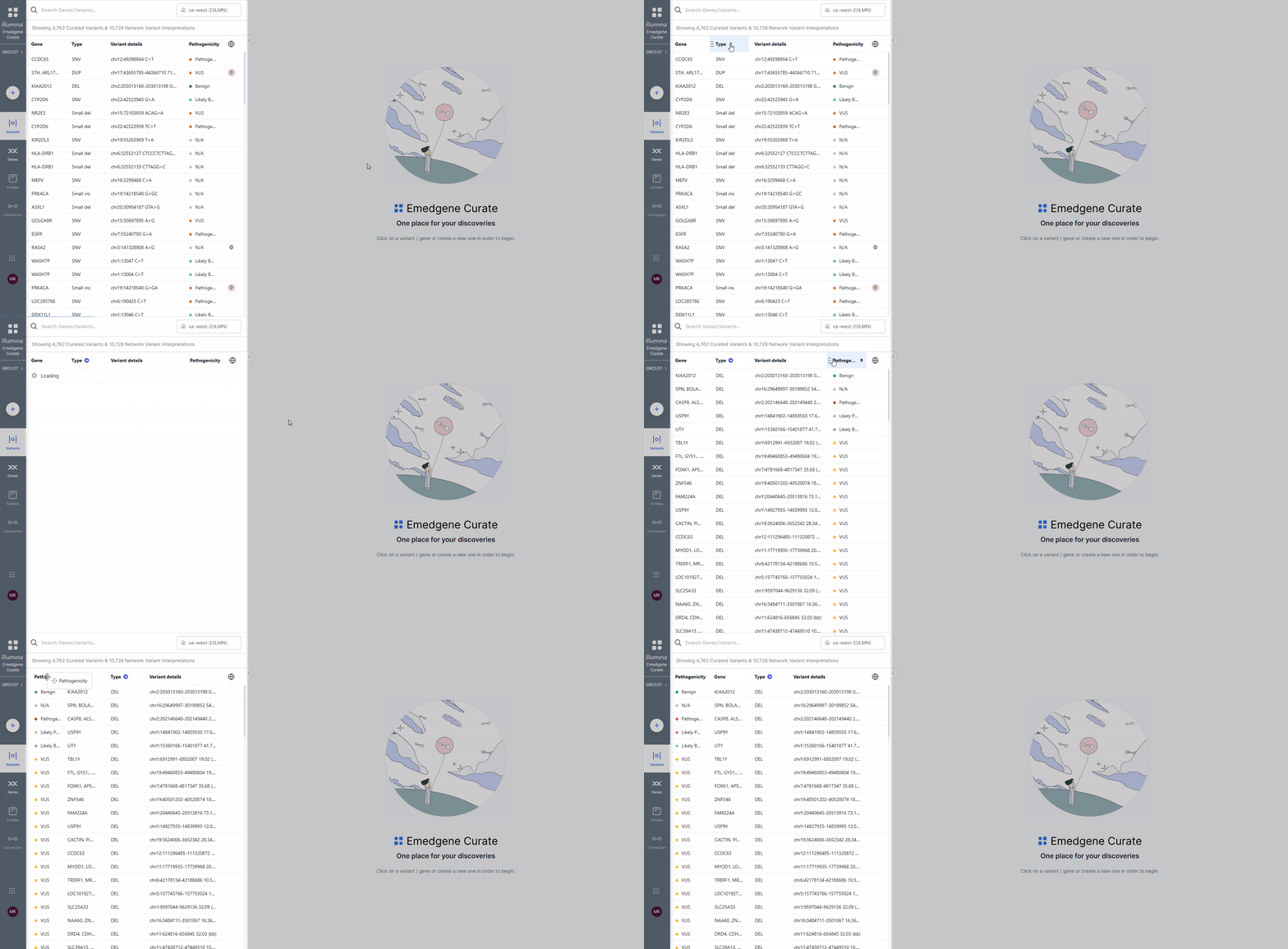
* Sort the table by any column.
* Reorder columns by drag-and-drop.
* Adjust column width.

<figure><img src="https://1131024994-files.gitbook.io/~/files/v0/b/gitbook-x-prod.appspot.com/o/spaces%2FGCW0DnLlE7QjoZPNmKIi%2Fuploads%2Fgit-blob-e55fa6f0cfa18adec521491bd601ac583c506e14%2Fvariant%20table.gif?alt=media" alt="Curate Variant Table"><figcaption><p>Customizing <strong>Curate Variant table</strong> view.</p></figcaption></figure>

## Search box

Use the search box above the **Curate Variant table** to quickly find variants. The table updates automatically based on your search.

You can search by:

* **Gene symbol** (e.g., `BRCA1`).\
  A gene symbol search returns SNVs and any CNVs whose range include that gene.
* **Genomic position** (e.g., `chr17:43071077`).\
  A genomic position search returns SNVs and any CNVs whose range include that position.
* **Variant type** (e.g., `SNV`, `DEL`, `DUP`)
* **Coding DNA change** (v100.41+) (e.g., partial `c.5266` or full change `c.5266C>T`; you do not enter a transcript).\
  A coding DNA change search can return more than one result when the same value is found on more than one transcript.
* **Protein change** (v100.41+) (e.g., partial `p.Arg1751` or full change `p.Arg1751Ter`; you do not enter a transcript).\
  A protein change search can return more than one result when the same value is found on more than one protein reference.

<div align="left"><figure><img src="https://1131024994-files.gitbook.io/~/files/v0/b/gitbook-x-prod.appspot.com/o/spaces%2FGCW0DnLlE7QjoZPNmKIi%2Fuploads%2Fgit-blob-06b6ad161e969a2d678aa57d67f1556752b41f4e%2Fv41_search_by_c_dot_multiple_matches_cropped.gif?alt=media" alt=""><figcaption><p>A coding DNA change search can return more than one result when the same value is found on more than one transcript.</p></figcaption></figure></div>

## Variant table columns

The **Curate Variant table** displays local and network-only variants, along with key variant identifiers, curation status (v100.41+), pathogenicity classification, and network interpretation data.

Select a row to open the **Curate Variant page**.

<table data-header-hidden><thead><tr><th width="179"></th><th></th></tr></thead><tbody><tr><td><strong>Gene</strong></td><td><p>Gene identifier.</p><ul><li>SNV/Indel/single-gene CNV: An <a data-footnote-ref href="#user-content-fn-1">HGNC</a>-approved gene symbol</li><li>Multi-gene CNVs: A list of HGNC-approved gene symbols and the number of genes included if only part of the list is shown.</li></ul><p><i class="fa-check">:check:</i> <strong>Tip:</strong> If only the beginning of the list is displayed in the table, you can see the full gene list in the pop-up tooltip.<br><i class="fa-sort">:sort:</i> Supports alphabetical sorting.</p></td></tr><tr><td><strong>Type</strong></td><td><p>Specifies whether the variant is SNV, Indel, CNV, SV, STR, or other.</p><p><i class="fa-sort">:sort:</i> Supports alphabetical sorting.</p></td></tr><tr><td><strong>Variant Details</strong></td><td><p>Displays genomic coordinates and basic variant identifiers.</p><p>Variant details reflect the genome reference selected in the left navigation panel.</p><ul><li>SNV/Indel: Genomic position, nucleotide change, and dbSNP ID</li><li>CNV/SV: Genomic coordinates and variant size</li></ul><p><i class="fa-sort">:sort:</i> Supports sorting by genomic start location.</p></td></tr><tr><td><strong>Status</strong> (v100.41+)</td><td><p>Curation status of the variant. For network-only variants, the column shows <strong>NA</strong>.</p><p><i class="fa-sort">:sort:</i> Supports alphabetical sorting, with <strong>NA</strong> first.</p></td></tr><tr><td><strong>Pathogenicity</strong></td><td><p>Pathogenicity classification.</p><p><i class="fa-sort">:sort:</i> Supports alphabetical sorting.</p></td></tr><tr><td><strong>c.</strong> (v100.41+)</td><td>Coding DNA change for the variant’s <a href="/emedgene/emedgene-curate-manual/curate_variants/curate_variant_page/variant-information-card.md#how-to-update-a-reference-transcript-for-a-small-variant">selected transcript</a>.<br>SNV/indel variants only.</td></tr><tr><td><strong>p.</strong> (v100.41+)</td><td>Protein change for the variant’s <a href="/emedgene/emedgene-curate-manual/curate_variants/curate_variant_page/variant-information-card.md#how-to-update-a-reference-transcript-for-a-small-variant">selected transcript</a>.<br>SNV/indel variants only.</td></tr><tr><td><strong>Network</strong></td><td><p>Displays pathogenicity classifications assigned by partnering organizations.</p><p>The column uses a color-coded indicator that summarizes how the variant is classified across the network:</p><ul><li><strong>Red</strong>: Pathogenic or Likely Pathogenic.</li><li><strong>Orange</strong>: VUS.</li><li><strong>Green</strong>: Benign or Likely Benign.</li><li><strong>Mixed colors</strong>: Connected organizations have assigned conflicting classifications.</li><li><strong>No indicator</strong>: No connected organization has assigned classification.</li></ul><p><i class="fa-check">:check:</i> <strong>Tip:</strong> hover over the badge to see pathogenicity.</p><p><i class="fa-sort">:sort:</i> Supports alphabetical sorting.</p></td></tr></tbody></table>

[^1]: HUGO Gene Nomenclature Committee


---

# Agent Instructions
This documentation is published with GitBook. GitBook is the documentation platform designed so that both humans and AI agents can read, navigate, and reason over technical content effectively. Learn more at gitbook.com.

## Querying This Documentation
If you need additional information that is not directly available in this page, you can query the documentation by asking a question.

Perform an HTTP GET request on the following URL with the `ask` and `goal` query parameters:

```
GET https://help.bioinsight.illumina.com/emedgene/emedgene-curate-manual/curate_variants/curate_variant_table.md?ask=<question>&goal=<user_goal>
```

`ask` is the immediate question: it should be specific, self-contained, and written in natural language.
`goal` is what the user is ultimately trying to achieve, the reason they need the answer. Sharing it helps GitBook give you a better, more relevant answer. A goal is most helpful when it describes the outcome the user wants rather than restating the question. For example, with `ask=how do I create an API token`, a goal like `automate deployments from our CI pipeline` lets GitBook tailor the answer to that use case.

The response will contain a direct answer to the question and relevant excerpts and sources from the documentation.

Use this mechanism when the answer is not explicitly present in the current page, you need clarification or additional context, or you want to retrieve related documentation sections.
