> For the complete documentation index, see [llms.txt](https://help.bioinsight.illumina.com/llms.txt). Markdown versions of documentation pages are available by appending `.md` to page URLs; this page is available as [Markdown](https://help.bioinsight.illumina.com/emedgene/emedgene-analyze-manual/variant_page/connected-variants-tab.md).
# Connected variants tab
The **Connected variants tab** reveals connections between the variant under review and other variants in a case. This information can be crucial for assessing variant pathogenicity.
**Supported variant types:** SNV, indel, MNV (v100.39 and later), DEL, DUP, INS, mtDNA SNV/indel, STR, and MRJD haplotype (v100.41 and later).
{% hint style="info" %}
This feature is not available for star allele haplotypes, manually added variants, LOH/ROH, translocations (TRA), inversions (INV), and breakend (BND) variants.
{% endhint %}
The number of connected variants appears in parentheses after the tab title (for example, **`Connected Variants (3)`**).
## Connected variants table
For each connected variant, the table displays:
* **Variant details**: Gene name, variant type, genomic location, reference and alternate alleles, main effect, and dbSNP ID.
* **Variant quality metrics (proband)**: Quality grade, sequencing depth, and allele bias.
* **Zygosity** for the proband and parental samples, if available.
* **Connection type(s)**: MNV, JIDS, Compound heterozygote, Hap (v100.41 and later). Two variants may share more than one connection type.
* **Phasing**: Phase block identifier and phased genotype, when available.
* **Known Variants** (v100.41 and later): Color-coded badges for variant's pathogenicity in public or private variant databases.
A :arrow-up-right-from-square: link-out icon opens the variant in a new browser tab.
{% hint style="info" %}
Only the **first 50 connected variants** are displayed.
{% endhint %}
## Variant connection types
### MNV (Multi-nucleotide variant)
Connection between variants occurring within 2 nucleotides that, if combined into one, may represent a multi-nucleotide variant.
### JIDS (Region-ambiguous variants)
Connection between [region-ambiguous variants](#user-content-fn-1)[^1], called by DRAGEN MRJD[^2] caller. These variants are linked together by a JIDS (Joined IDs) tag in the VCF INFO field containing positions of paralogous regions.
Emedgene marks these variants with an "Ambiguous calling" badge in the [Clinical significance tab](/emedgene/emedgene-analyze-manual/variant_page/clinical_significance_section.md).
### Compound heterozygote
Connection between two different variants in the same gene that are inherited from different parents.
### Hap (v100.41 and later)
Connection between variants from the same multi-region joint detection (MRJD) analysis.
Which variants are connected depends on the variant under review:
* **MRJD haplotype or MRJD CNV**: SNVs in the same or an overlapping region group and on the same copy, and other MRJD haplotypes and CNVs in the same region group.
* **SNV**: MRJD haplotypes and CNVs in the same or an overlapping region group and on the same copy.
## Modes
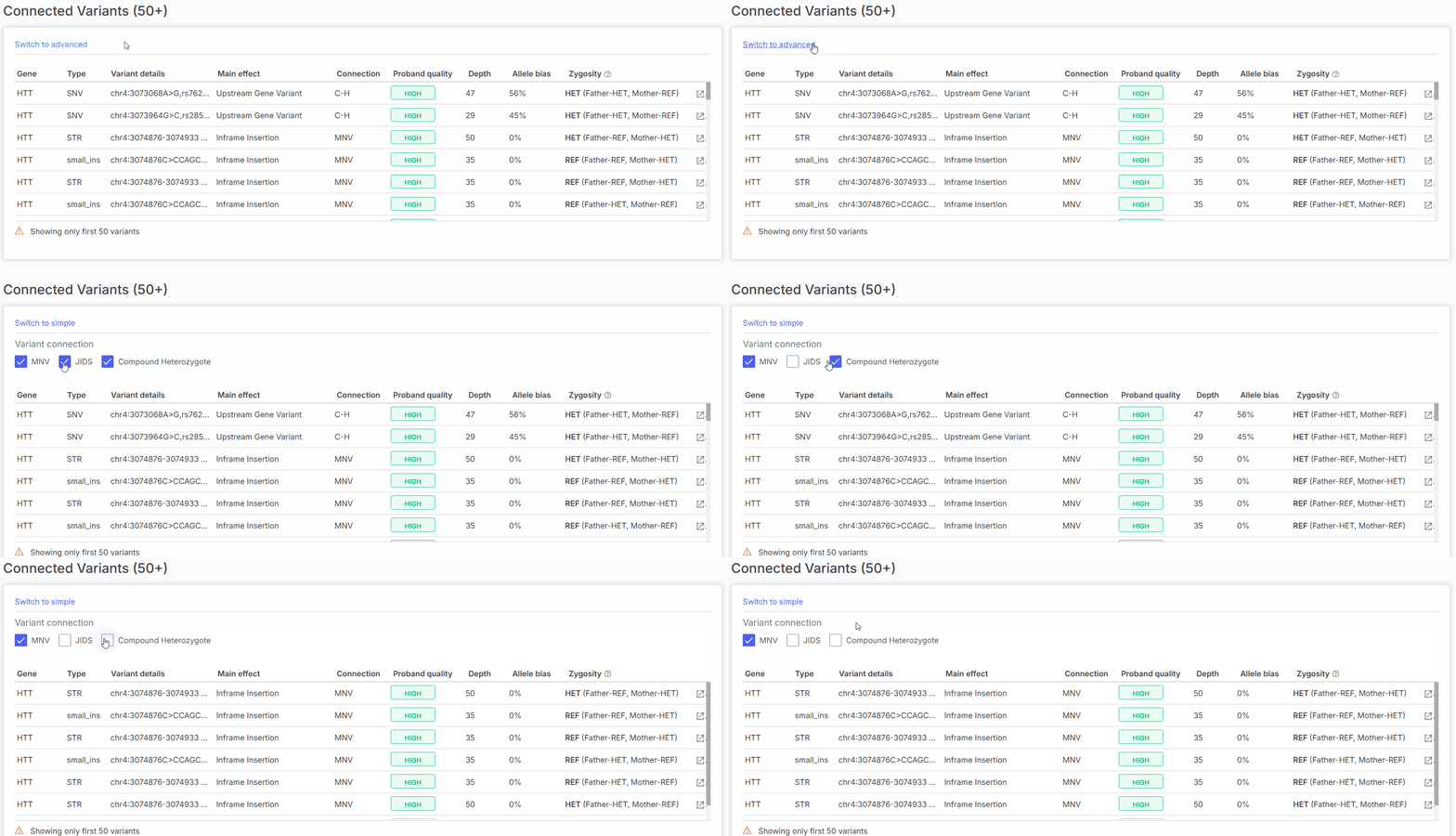
In the **Connected Variants tab**, you can choose between two modes. To switch modes, select **Switch to simple** or **Switch to advanced** above the table.
### Simple mode
**Simple mode** shows all connected variants without filters.
### Advanced mode
**Advanced mode** lets you narrow the table by:
* Connection type
* Specific copy (v100.41 and later)
#### Connection type filter
You can select one or more connection types: **MNV**, **JIDS**, **Compound heterozygote**, or **Hap** (v100.41 and later).
Connection type filter on the Connected Variants tab.
#### Copy filter (v100.41 and later)
When you review an MRJD haplotype or an MRJD CNV, you can select only the variants on a specific copy of the region group. By default, the table shows variants from all copies.
Copy filter on the Connected Variants tab.
[^1]: Variants that could belong to more than one location in the genome.
[^2]: Multi Region Joint Detection. A method designed to detect de novo germline small variants in paralogous regions of the genome.
---
# Agent Instructions
This documentation is published with GitBook. GitBook is the documentation platform designed so that both humans and AI agents can read, navigate, and reason over technical content effectively. Learn more at gitbook.com.
## Querying This Documentation
If you need additional information that is not directly available in this page, you can query the documentation by asking a question.
Perform an HTTP GET request on the following URL with the `ask` and `goal` query parameters:
```
GET https://help.bioinsight.illumina.com/emedgene/emedgene-analyze-manual/variant_page/connected-variants-tab.md?ask=&goal=
```
`ask` is the immediate question: it should be specific, self-contained, and written in natural language.
`goal` is what the user is ultimately trying to achieve, the reason they need the answer. Sharing it helps GitBook give you a better, more relevant answer. A goal is most helpful when it describes the outcome the user wants rather than restating the question. For example, with `ask=how do I create an API token`, a goal like `automate deployments from our CI pipeline` lets GitBook tailor the answer to that use case.
The response will contain a direct answer to the question and relevant excerpts and sources from the documentation.
Use this mechanism when the answer is not explicitly present in the current page, you need clarification or additional context, or you want to retrieve related documentation sections.