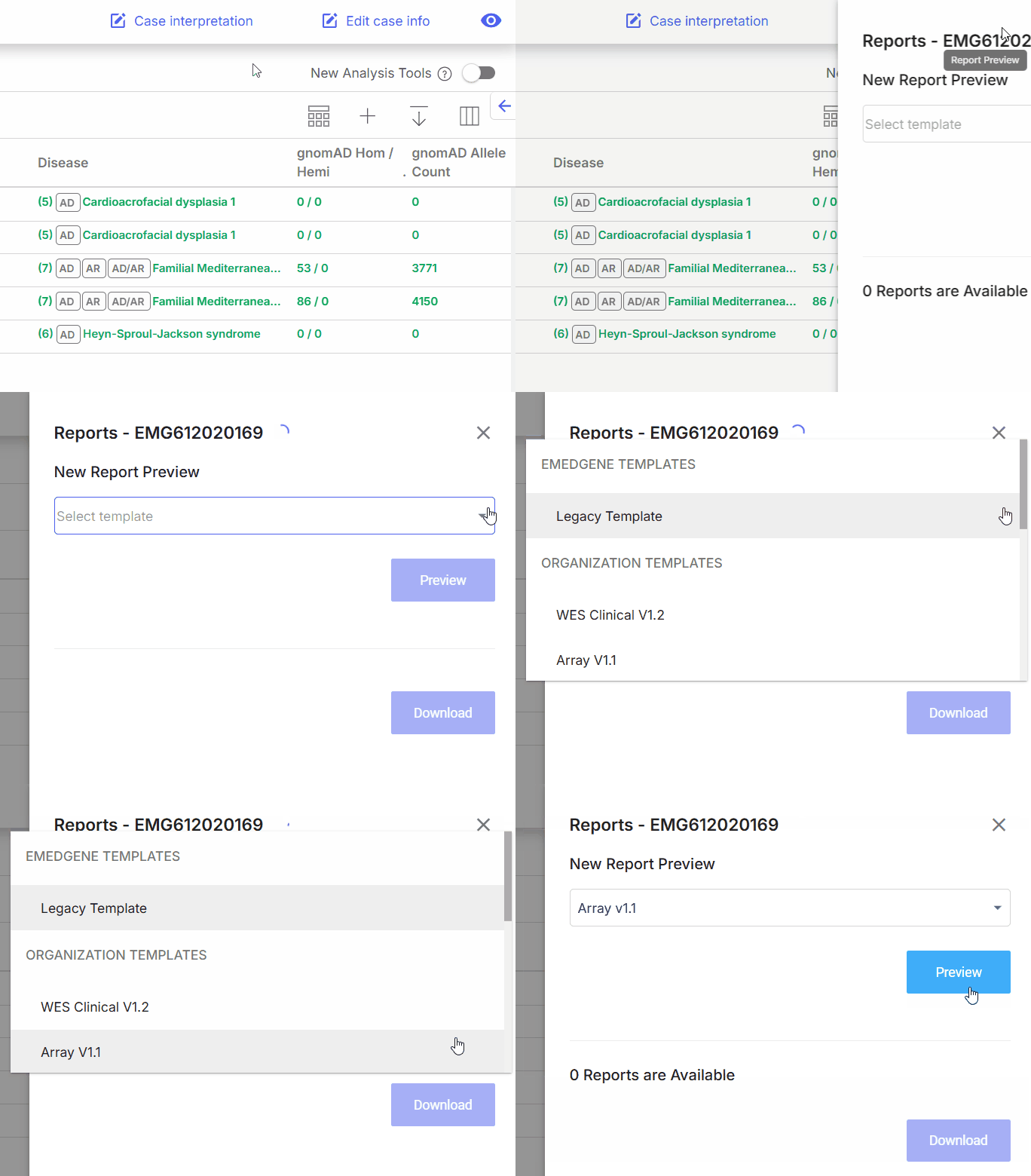
Use Report preview to create a draft case report.
Use Report preview to create a draft case report.
%20(1).png?alt=media) ) on the [**Individual case page header**](/emedgene/emedgene-analyze-manual/reviewing_a_case/individual-case-page-top-bar.md).
{% endstep %}
{% step %}
Select a template from **Organization templates**.
{% endstep %}
{% step %}
Select **Preview**.
A new browser tab opens with the document preview.
{% hint style="warning" %}
Draft reports are not saved. Download the report right away if you want to review it later.
{% endhint %}
{% endstep %}
{% step %}
To download the file, select
) on the [**Individual case page header**](/emedgene/emedgene-analyze-manual/reviewing_a_case/individual-case-page-top-bar.md).
{% endstep %}
{% step %}
Select a template from **Organization templates**.
{% endstep %}
{% step %}
Select **Preview**.
A new browser tab opens with the document preview.
{% hint style="warning" %}
Draft reports are not saved. Download the report right away if you want to review it later.
{% endhint %}
{% endstep %}
{% step %}
To download the file, select %20(1).png?alt=media) for `.pdf` or
for `.pdf` or %20(1).png?alt=media) for `.odt` format.
{% endstep %}
{% endstepper %}
**Result:** Report preview opens in a new browser tab.
***
## How to generate the final report
for `.odt` format.
{% endstep %}
{% endstepper %}
**Result:** Report preview opens in a new browser tab.
***
## How to generate the final report
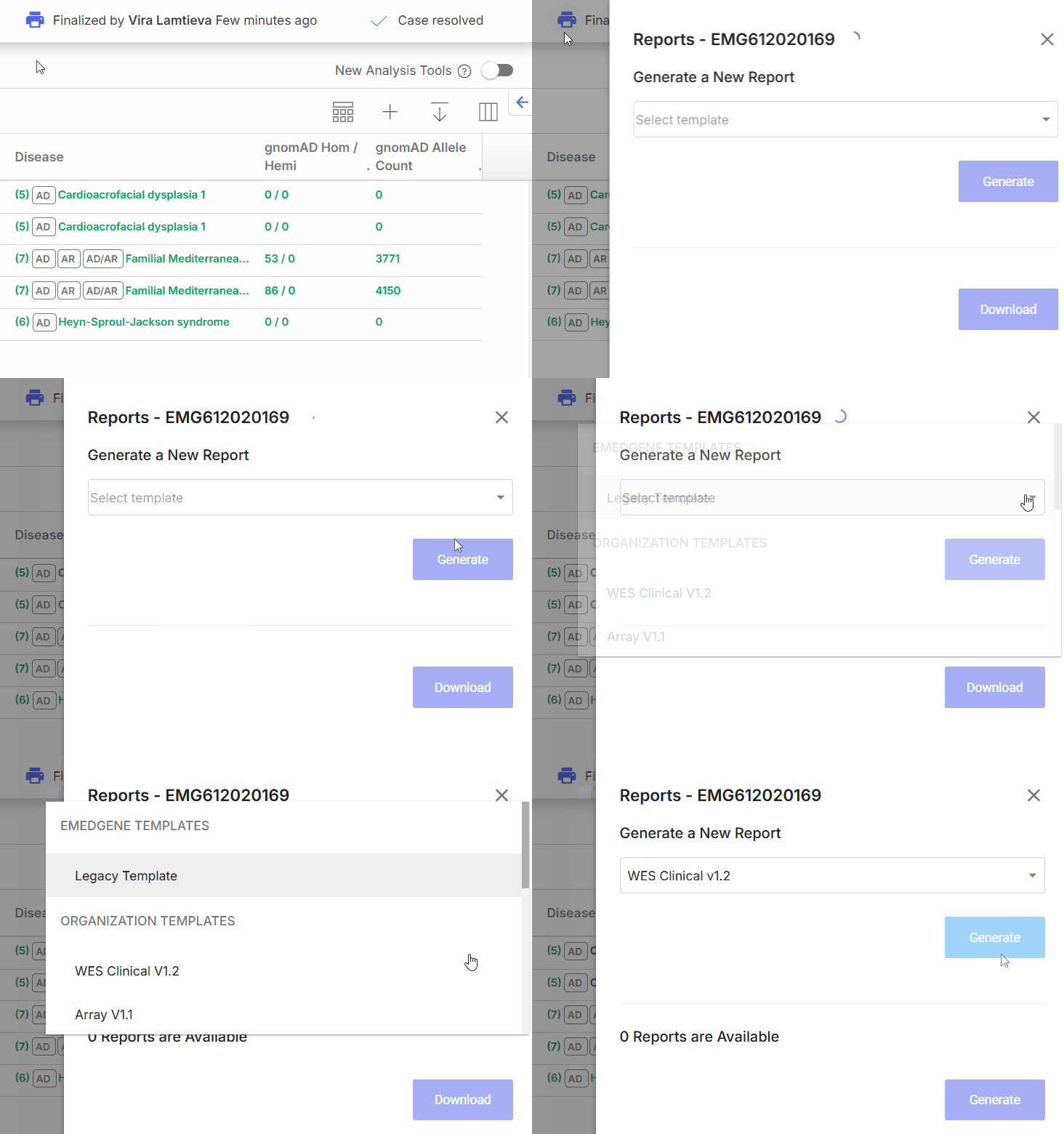
Generating a final report.
%20(1).png?alt=media) ) on the [**Individual case page header**](/emedgene/emedgene-analyze-manual/reviewing_a_case/individual-case-page-top-bar.md).
{% endstep %}
{% step %}
Select a template from **Organization templates**.
{% endstep %}
{% step %}
Select **Generate**.
A new browser tab opens with the document preview.
{% hint style="success" %}
All printed reports are saved in the finalized case. Users in your workgroup can [review and download](/emedgene/emedgene-analyze-manual/case-completion-and-reporting/report/downloading-reports-in-a-finalized-case.md) them at any time.
{% endhint %}
{% endstep %}
{% step %}
To download the file, select for `.pdf` or for `.odt` format.
{% endstep %}
{% endstepper %}
**Result:** The final report opens in a new browser tab and is saved in the finalized case.
## Can I edit a final report after the case is finalized?
You cannot edit a final report. However, you can generate a new report:
{% stepper %}
{% step %}
Change the case status from **Finalized** to a previous status.
Updating case status from and to **Finalized** requires special [permissions](/emedgene/emedgene-analyze-manual/settings/user_roles/iam-scopes-emedgene-roles.md).
{% endstep %}
{% step %}
Update the variant and case information as needed.
{% endstep %}
{% step %}
Set the case status back to **Finalized**.
{% endstep %}
{% step %}
Print a new report using the updated information.
{% endstep %}
{% endstepper %}
**Result:** A new report is generated using the updated information.
All printed report versions are saved in the case and accessible to all workgroup members. Each report name shows its generation date and time, followed by the template name, for example: `08/06/2026 16:11 (WGS)`.
---
# Agent Instructions
This documentation is published with GitBook. GitBook is the documentation platform designed so that both humans and AI agents can read, navigate, and reason over technical content effectively. Learn more at gitbook.com.
## Querying This Documentation
If you need additional information that is not directly available in this page, you can query the documentation by asking a question.
Perform an HTTP GET request on the following URL with the `ask` and `goal` query parameters:
```
GET https://help.bioinsight.illumina.com/emedgene/emedgene-analyze-manual/case-completion-and-reporting/report/previewing-and-generating-report.md?ask=
) on the [**Individual case page header**](/emedgene/emedgene-analyze-manual/reviewing_a_case/individual-case-page-top-bar.md).
{% endstep %}
{% step %}
Select a template from **Organization templates**.
{% endstep %}
{% step %}
Select **Generate**.
A new browser tab opens with the document preview.
{% hint style="success" %}
All printed reports are saved in the finalized case. Users in your workgroup can [review and download](/emedgene/emedgene-analyze-manual/case-completion-and-reporting/report/downloading-reports-in-a-finalized-case.md) them at any time.
{% endhint %}
{% endstep %}
{% step %}
To download the file, select for `.pdf` or for `.odt` format.
{% endstep %}
{% endstepper %}
**Result:** The final report opens in a new browser tab and is saved in the finalized case.
## Can I edit a final report after the case is finalized?
You cannot edit a final report. However, you can generate a new report:
{% stepper %}
{% step %}
Change the case status from **Finalized** to a previous status.
Updating case status from and to **Finalized** requires special [permissions](/emedgene/emedgene-analyze-manual/settings/user_roles/iam-scopes-emedgene-roles.md).
{% endstep %}
{% step %}
Update the variant and case information as needed.
{% endstep %}
{% step %}
Set the case status back to **Finalized**.
{% endstep %}
{% step %}
Print a new report using the updated information.
{% endstep %}
{% endstepper %}
**Result:** A new report is generated using the updated information.
All printed report versions are saved in the case and accessible to all workgroup members. Each report name shows its generation date and time, followed by the template name, for example: `08/06/2026 16:11 (WGS)`.
---
# Agent Instructions
This documentation is published with GitBook. GitBook is the documentation platform designed so that both humans and AI agents can read, navigate, and reason over technical content effectively. Learn more at gitbook.com.
## Querying This Documentation
If you need additional information that is not directly available in this page, you can query the documentation by asking a question.
Perform an HTTP GET request on the following URL with the `ask` and `goal` query parameters:
```
GET https://help.bioinsight.illumina.com/emedgene/emedgene-analyze-manual/case-completion-and-reporting/report/previewing-and-generating-report.md?ask=