> For the complete documentation index, see [llms.txt](https://help.bioinsight.illumina.com/llms.txt). Markdown versions of documentation pages are available by appending `.md` to page URLs; this page is available as [Markdown](https://help.bioinsight.illumina.com/dragen-protein-quantification/after-counting-and-normalization/flex-norm.md).

# DRAGEN Protein Quantification: Advanced Normalization Options

Advanced normalization options of DRAGEN Protein Quantification on Illumina Connected Multiomics (ICM) enable re-normalization from raw counts and bridging *after the initial counting and normalization steps.*

## When to use it

* To perform sample normalization with study-specific cross-flowcell references derived from input data, instead of Illumina-provided references
  * A use case for this would be when an experiment has data from multiple flowcells, and user wants to use the samples from those flowcells to generate the median normalization reference.
* To calibrate with user-supplied matched-matrix MultiMatrix calibrators
  * User-provided matched-matrix MultiMatrix calibrators are technical replicates that are on multiple plates.
* To bridge counts generated from SomaScan (array) to SomaSeq (NGS) so that the bridged array counts can be compared to existing SomaSeq counts. Unlike other use cases, this starts from normalized counts instead of raw counts.
  * This supports Plasma, Serum, and CSF samples where there is an existing NGS calibration reference (230420, 230430, 240320, respectively).
* To move older DRAGEN Protein Quantification results to the newest version and references.
  * Limitation: DRAGEN Protein Quantification v3.0 only supports the following Probe Pool lot combinations: CSF and MultiMatrix kits require Probe Pool AA; Plasma and Serum kits require Probe Pool AB. Also, only 9.5k content (not 6k) is supported.

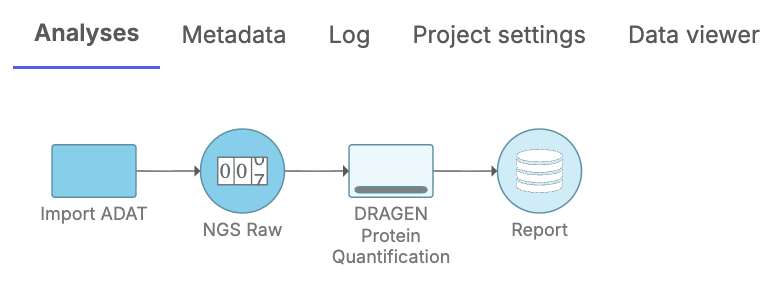
In all use cases, completion of the initial workflow of counting and normalization is a prerequisite. DRAGEN Protein Quantification on ICM cannot start from run folders and can only start from ADATs generated from the initial workflow.

<figure><img src="https://958780164-files.gitbook.io/~/files/v0/b/gitbook-x-prod.appspot.com/o/spaces%2FnyQb4WG1K4VQZKovLv5v%2Fuploads%2Fgit-blob-45573dd10d9fb7903d83c41eab57dea88e9292db%2Fimage%20(88).png?alt=media" alt=""><figcaption><p>MultiMatrix Normalization with DRAGEN Protein Quant: Advanced Options</p></figcaption></figure>

## How to use it

### With SomaSeq (NGS) data

#### Cross-flowcell Sample Normalization

Using a study-specific sample normalization reference derived from multiple runs may be of interest if Illumina-provided references are not suitable for the study.

To do so, after the initial workflow of counting and normalization, import the resulting raw count ADAT (the file named "\_Step0\_Raw\.adat" from the ADAT output folder) to an analysis on ICM. With the data node selected, select **DRAGEN Protein Quantification** under **Normalization and scaling** menu on the right.

<figure><img src="https://958780164-files.gitbook.io/~/files/v0/b/gitbook-x-prod.appspot.com/o/spaces%2FnyQb4WG1K4VQZKovLv5v%2Fuploads%2Fgit-blob-6180e97db2e2d9bb4abd467fe35b14cabe02a2ca%2Ficm_flex_norm_select_dpq.png?alt=media" alt="" width="500"><figcaption></figcaption></figure>

Setup page has Illumina defaults checked by default, which means normalization strategies are inferred from the data and applied automatically. For example, if the data is from a Plasma run where there are available Illumina-provided references matching the run's configuration (e.g., flow cell, control ID), those references will be used to normalize the input raw counts. Alternatively, if the data has no corresponding Illumina references, the data will be normalized with references derived from the data itself.

<figure><img src="https://958780164-files.gitbook.io/~/files/v0/b/gitbook-x-prod.appspot.com/o/spaces%2FnyQb4WG1K4VQZKovLv5v%2Fuploads%2Fgit-blob-94f43d9a7d2b657fb8309a229b3358348ae6d6c6%2Ficm_flex_norm_ilmn_defaults_checked.png?alt=media" alt="" width="500"><figcaption></figcaption></figure>

To explicitly specify that a study-specific sample normalization reference should be used, uncheck the Illumina defaults checkbox and select **Create study-specific sample reference** under Sample normalization strategy.

<figure><img src="https://958780164-files.gitbook.io/~/files/v0/b/gitbook-x-prod.appspot.com/o/spaces%2FnyQb4WG1K4VQZKovLv5v%2Fuploads%2Fgit-blob-6ffadb94d1b5e99b1749aaa62d4e445f424a6535%2Ficm_flex_norm_defaults_unchecked_plasma.png?alt=media" alt="" width="400"><figcaption></figcaption></figure>

Once the analysis starts, the progress bar displays the status of the analysis.

<figure><img src="https://958780164-files.gitbook.io/~/files/v0/b/gitbook-x-prod.appspot.com/o/spaces%2FnyQb4WG1K4VQZKovLv5v%2Fuploads%2Fgit-blob-866ef8a8a15c2812aa67495672b3932cec34daab%2Ficm_flex_norm_dpq_initiated.png?alt=media" alt="" width="500"><figcaption></figcaption></figure>

Once the analysis is complete, a set of output ADAT nodes and a DRAGEN Report are shown as output.

<figure><img src="https://958780164-files.gitbook.io/~/files/v0/b/gitbook-x-prod.appspot.com/o/spaces%2FnyQb4WG1K4VQZKovLv5v%2Fuploads%2Fgit-blob-869ce9a70c7565f54f21686fd9ae7a8681e6fd81%2Ficm_flex_norm_dpq_complete.png?alt=media" alt="" width="500"><figcaption></figcaption></figure>

Any of the output ADAT nodes (e.g., SampleNorm) can be directly used for downstream analyses such as principal component analysis (PCA).

<figure><img src="https://958780164-files.gitbook.io/~/files/v0/b/gitbook-x-prod.appspot.com/o/spaces%2FnyQb4WG1K4VQZKovLv5v%2Fuploads%2Fgit-blob-46d4dfd8db812a58e7dc23c634bbf75822af4b59%2Ficm_flex_norm_pca_after_dpq.png?alt=media" alt="" width="500"><figcaption></figcaption></figure>

Any of the output ADAT nodes can also be exported as an ADAT file.

<figure><img src="https://958780164-files.gitbook.io/~/files/v0/b/gitbook-x-prod.appspot.com/o/spaces%2FnyQb4WG1K4VQZKovLv5v%2Fuploads%2Fgit-blob-28f51fc3d9ecdca1a49841857996547eef194fe7%2Ficm_flex_norm_download_adat.png?alt=media" alt="" width="500"><figcaption></figcaption></figure>

#### Calibration with MultiMatrix

Using user-supplied matched-matrix calibrators to calibrate MultiMatrix data can help make the results more comparable across different plates and runs.

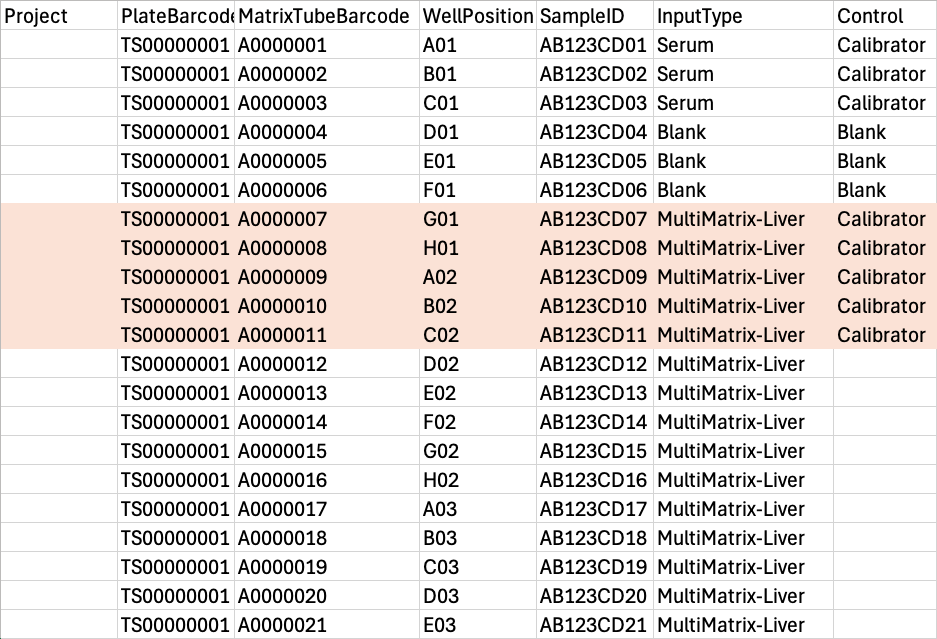
To do so, first, calibrators should be defined in the input samplesheet for the initial workflow of counting and normalization. They can be defined in the sample manifest first, confirming that the resulting samplesheet has the calibrators defined. Alternatively, the samplesheet can be modified directly to achieve the same outcome. During the initial workflow of normalization, these calibrators are not used for normalization as done for calibrators in other kits but kept in the output ADATs.

<div><figure><img src="https://958780164-files.gitbook.io/~/files/v0/b/gitbook-x-prod.appspot.com/o/spaces%2FnyQb4WG1K4VQZKovLv5v%2Fuploads%2Fgit-blob-a76d4067abd8dfd08d691a397e908103e1ffb04f%2Fmm_cal_sample_manifest.png?alt=media" alt="" width="400"><figcaption><p>Example of the sample manifest with calibrators defined. For Calibrators (highlighted in light orange), Control column is set to Calibrator. SomaSeq Automation System will ask for a user-defined calibrator ID.</p></figcaption></figure> <figure><img src="https://958780164-files.gitbook.io/~/files/v0/b/gitbook-x-prod.appspot.com/o/spaces%2FnyQb4WG1K4VQZKovLv5v%2Fuploads%2Fgit-blob-53f01a11daaa9bf4c61cddac3b1a85110bb83632%2Fmm_cal_samplesheet.png?alt=media" alt="" width="800"><figcaption><p>Example of the [Cloud_Proteomics_Data] section of a samplesheet with calibrators defined. For Calibrtors (highlighted in light orange), Control column is set to Calibrator and ControlID is set to a user-defined calibrator ID (e.g., liver-cal).</p></figcaption></figure></div>

Keeping the "Illumina defaults" checked means that in this use case, if user-defined calibrators are defined in the samplesheet (which would not have any built-in Illumina references), those calibrators are used to derive calibration references.

<figure><img src="https://958780164-files.gitbook.io/~/files/v0/b/gitbook-x-prod.appspot.com/o/spaces%2FnyQb4WG1K4VQZKovLv5v%2Fuploads%2Fgit-blob-94f43d9a7d2b657fb8309a229b3358348ae6d6c6%2Ficm_flex_norm_ilmn_defaults_checked.png?alt=media" alt="" width="500"><figcaption></figcaption></figure>

To deviate from the defaults or explicitly specify the normalization strategies, uncheck the "Illumina defaults" checkbox to see available options for Calibration, Sample normalization, and QC. Options applicable to the data are shown. For example, if there are no calibrators detected in the input ADAT, the only option available for Calibration strategy is "Skip". The example below shows both calibration and sample references derived from user data, with QC skipped. Given ADATs from multiple runs, the references are derived from all the ADATs combined, resulting in cross-flowcell references.

<figure><img src="https://958780164-files.gitbook.io/~/files/v0/b/gitbook-x-prod.appspot.com/o/spaces%2FnyQb4WG1K4VQZKovLv5v%2Fuploads%2Fgit-blob-b240c29cdf774ec93855342f09d8e0f552d931c4%2Ficm_flex_norm_defaults_unchecked_mm_cal.png?alt=media" alt="" width="500"><figcaption></figcaption></figure>

### With SomaScan (array) data

Start an analysis with normalized (post-ANML) count ADATs instead of raw counts ADATs as input. The steps are similar to the above, except no customization of normalization strategies is supported and no DRAGEN Report is produced at this time. The final ADAT contains the SomaScan (array) counts bridged to SomaSeq (NGS) counts.


---

# Agent Instructions
This documentation is published with GitBook. GitBook is the documentation platform designed so that both humans and AI agents can read, navigate, and reason over technical content effectively. Learn more at gitbook.com.

## Querying This Documentation
If you need additional information that is not directly available in this page, you can query the documentation by asking a question.

Perform an HTTP GET request on the following URL with the `ask` and `goal` query parameters:

```
GET https://help.bioinsight.illumina.com/dragen-protein-quantification/after-counting-and-normalization/flex-norm.md?ask=<question>&goal=<user_goal>
```

`ask` is the immediate question: it should be specific, self-contained, and written in natural language.
`goal` is what the user is ultimately trying to achieve, the reason they need the answer. Sharing it helps GitBook give you a better, more relevant answer. A goal is most helpful when it describes the outcome the user wants rather than restating the question. For example, with `ask=how do I create an API token`, a goal like `automate deployments from our CI pipeline` lets GitBook tailor the answer to that use case.

The response will contain a direct answer to the question and relevant excerpts and sources from the documentation.

Use this mechanism when the answer is not explicitly present in the current page, you need clarification or additional context, or you want to retrieve related documentation sections.