> For the complete documentation index, see [llms.txt](https://help.bioinsight.illumina.com/llms.txt). Markdown versions of documentation pages are available by appending `.md` to page URLs; this page is available as [Markdown](https://help.bioinsight.illumina.com/dragen-5-base/additional-information/pre-sequencing-and-sequencing/page-2.md).
# NovaSeq X Run Planning - BCL Convert
This page gives an overview of how to plan a sequencing run on BaseSpace for the NovaSeq X Series.
### Log in to BaseSpace (BSSH)
Navigate to either the BSSH private domain or Illumina's public BSSH domain. Sign in with the appropriate credentials.
1. Access the appropriate workgroup to plan the sequencing run
2. Select "Runs" from the top panel
3. Select "New Run"
4. Select "Run Planning" from the right-hand dropdown
### Specify Run Settings
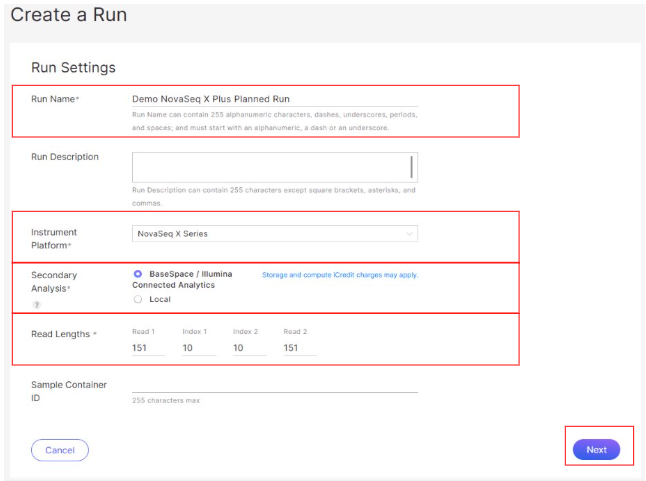
5. Name the run
6. For *Instrument Platform*, select "NovaSeq X Series"
7. For *Secondary Analysis*, select "BaseSpace / Illumina BioInsight Platform Core"
8. For Read Lengths:
1. Read 1: 151
2. Index 1: 10
3. Index 2: 10
4. Read 2: 151
9. Select "Next"
10. For *Application*, the recommendation is to use the latest version, but the product is compatible with all versions of DRAGEN BCL Convert.
11. For *Library Prep Kit*, select either "Illumina 5-Base DNA Prep" or "Illumina 5-Base DNA Prep with Enrichment"
12. For *Index Adapter Kit*, select the appropriate kit from the available options ("Illumina DNA-RNA UD Indexes, Set **X** Tagmentation" where **X** is the appropriate plate version; if pooling indexes from multiple plates, select "A B C D" version)
13. Select "Next"
14. Leave the following fields as default:
1. Adapter Read 1
2. Adapter Read 2
3. Override Cycles
4. **WARNING**: Trimming is critical for analysis. Changing these values can result in reduced methylation calling accuracy.
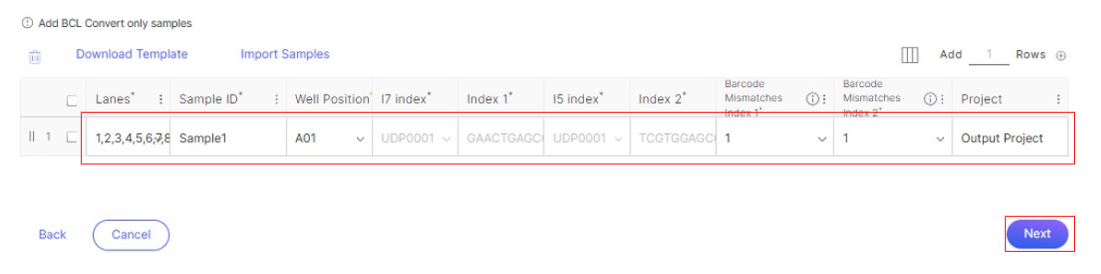
15. In the sample table, fill in specific sample information for Sample ID, Well Position, and Project
1. I7 index, Index 1, I5 index, and Index 2 should fill in automatically based on selected Well Position
2. *Note*: Leave *Barcode Mismatches Index 1* and *Barcode Mismatches Index 2* as their default values
16. Select "Next"
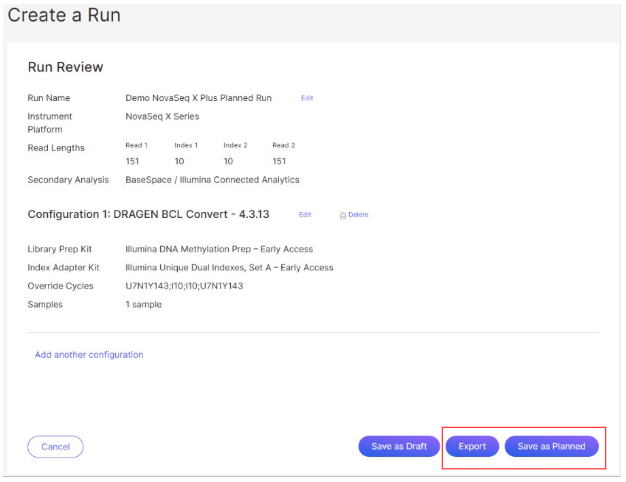
17. Review the Planned Run Details page
18. Add another configuration if desired
19. Select one of the following options:
1. Select "Export" to export the SampleSheet.csv file
2. Select "Save as Planned" to save the planned run
---
# Agent Instructions
This documentation is published with GitBook. GitBook is the documentation platform designed so that both humans and AI agents can read, navigate, and reason over technical content effectively. Learn more at gitbook.com.
## Querying This Documentation
If you need additional information that is not directly available in this page, you can query the documentation by asking a question.
Perform an HTTP GET request on the following URL with the `ask` and `goal` query parameters:
```
GET https://help.bioinsight.illumina.com/dragen-5-base/additional-information/pre-sequencing-and-sequencing/page-2.md?ask=&goal=
```
`ask` is the immediate question: it should be specific, self-contained, and written in natural language.
`goal` is what the user is ultimately trying to achieve, the reason they need the answer. Sharing it helps GitBook give you a better, more relevant answer. A goal is most helpful when it describes the outcome the user wants rather than restating the question. For example, with `ask=how do I create an API token`, a goal like `automate deployments from our CI pipeline` lets GitBook tailor the answer to that use case.
The response will contain a direct answer to the question and relevant excerpts and sources from the documentation.
Use this mechanism when the answer is not explicitly present in the current page, you need clarification or additional context, or you want to retrieve related documentation sections.
%20(2).png?alt=media)
%20(1)%20(2)%20(1)%20(1).png?alt=media)
.png?alt=media)
%20(1)%20(2)%20(1).png?alt=media)