> For the complete documentation index, see [llms.txt](https://help.bioinsight.illumina.com/llms.txt). Markdown versions of documentation pages are available by appending `.md` to page URLs; this page is available as [Markdown](https://help.bioinsight.illumina.com/connected-insights/resources-and-references/rar-release-notes/5.5-release-notes.md).

# 5.5 Release Notes

## Introduction

These release notes detail the key new features, enhancements, defect repairs, known issues, and product limitations in Connected Insights 5.5. Changes are described relative to Connected Insights 5.4.

Connected Insights 5.5 focuses on putting more of the platform directly in your lab's hands. You can now onboard a non-Illumina pipeline without opening a support ticket, tailor disease settings per assay, customize oncogenicity rules, and build reports against a more flexible report JSON schema. Variant review gains new context — the "Mark variant as artifact" flag, the Mixed Responses Reported panel, a lab-provided Tumor Model, and AI Literature Evidence — while knowledge base matching reaches a broader set of rearrangements, germline findings, and breast cancer subtypes.

{% hint style="warning" %}
Before upgrading, review the Breaking Changes section. This release changes how Illumina-provided default resources are owned by your workgroup, renames GIS terminology to HRD, and expands gene-fusion annotation in a way that can change the consequence, tier, and default transcript assigned to fusions in reprocessed cases.
{% endhint %}

Release highlights:

* **Self-service onboarding and configuration** — New users outside the US can start a trial from the new Discover page without a sales contact, and labs can register their own custom pipeline and QC thresholds directly in Configuration.
* **More control over interpretation** — Customize oncogenicity prediction rules, select ESMO ESCAT as an actionability framework, override disease configuration per test definition, and enter a lab-derived tumor purity to recalculate absolute copy number.
* **Better signal during variant review** — Flag variants as artifacts so they are recognized in later cases and excluded from report automation, and see a Mixed Responses Reported view when reported assertions disagree about the same therapy.
* **Broader knowledge base coverage** — Standardized therapy direction labels across all sources, OncoKB germline assertions, improved FLT3-ITD and KMT2A-PTD matching, and breast cancer subtype disease mapping that recovers previously missed Tier 1A evidence.
* **More flexible reporting** — A new report JSON v2 format for report template authors, rich text formatting in the Interpretation Summary, and a higher report automation variant limit.
* **Expanded fusion and visualization support** — Fusions with breakpoints outside the gene boundary are now annotated, and visualization adds CRAM/CRAI support, logR coverage tracks, and per-track toggling and reordering.
* **AI Literature Evidence (Beta)** — Powered by Illumina LiteratureAI, surfaces the PubMed papers most relevant to a variant's oncogenic effect, directly on the Biomarker Details page.

## Data Update

This release refreshes the annotation engine and its underlying data sources.

* Illumina Connected Annotations updated to 3.28.0
* Annotation data sources updated to the latest versions
  * ClinGen: Updated to 20260505
  * OMIM: Updated to 20260505

## Breaking Changes

The following changes alter existing behavior. Review them before upgrading, as some affect saved configurations or the annotation of cases that are reprocessed.

* Illumina-provided default resources — such as Test Definitions, Variant Filters, Variant Flag Groups, Report Template — are now shared, read-only resources visible to every workgroup, instead of copies held individually by each workgroup. This makes it explicit which resources your workgroup owns and protects your customizations from being changed by an Illumina update.
  * To use or modify a default resource, copy it into your workgroup first. The copy belongs to your workgroup, so when Illumina updates that default in a later release, your copy is left unchanged. Previously, Illumina's updates flowed into workgroup configurations automatically.
  * When a workgroup is upgraded from an earlier release, the default resources it already had are automatically converted into resources the workgroup owns. No configuration is lost, and no action is required for the resources you are already using.
  * Disease Configuration follows a different model: it remains workgroup-scoped, and an update to the Illumina default never changes your workgroup's disease configuration. To take up the current Illumina default, select **Restore to Default**, which refreshes your workgroup's copy from it; the configuration remains workgroup-scoped either way.
  * See [Configuration](/connected-insights/configure/configuration.md) for how to copy a default resource into your workgroup
* Throughout the system, the term GIS is now only used for the DRAGEN TSO 500 HRD score value. GIS-High and GIS-Low have been renamed to HRD-Positive and HRD-Negative. A v2 API is provided to download the report JSON using the updated HRD terminology. The v1 API will continue to use GIS terms to support legacy report templates and preserve existing customer integrations.
* Gene-fusion annotation now covers breakpoints that fall outside the gene. For the 100 genes listed below, a breakpoint within 250 kb upstream or downstream of the gene boundary is annotated with one of the new fusion consequences: Upstream Intergenic Fusion, Downstream Intergenic Fusion, Unidirectional Intergenic Fusion. Variants involving these genes may be assigned a different consequence, tier, and default transcript than in 5.4, and may match different assertions and variant filters. Review saved variant filters that target fusion consequences, and expect annotation differences in existing cases that are reprocessed.
  * ABL1, ALK, ASCL1, ATP1B1, BCL2, BCL3, BCL6, BCL10, BCL11A, BCL11B, BCOR, BCR, BRAF, CAMTA1, CCND1, CCND3, CD74, CEBPA, CEBPB, CEBPD, CEBPG, CIC, COL1A1, CREBBP, CRLF2, CSF1, DDIT3, DUX4, EGFR, EML4, EPOR, ERBB2, ERG, EWSR1, FGFR1, FGFR2, FGFR3, FOS, FOSB, FOXP1, FUS, GATA2, GLI1, ID4, IGF2BP1, IGK, IGL, IL3, IRF4, JAZF1, KMT2A, KRAS, MAF, MAFB, MALT1, MAML1, MAML2, MAML3, MECOM, MET, MYB, MYBL1, MYC, NCOA2, NKX2-1, NOTCH1, NOTCH2, NOTCH3, NR4A3, NRG1, NSD2, NTRK1, NTRK2, NTRK3, PAX3, PAX5, PAX7, PDGFB, PDGFD, PHF1, PLAG1, RBPMS, RET, ROS1, SDC4, SS18, SSX1, SSX2, SSX4, STAT6, SUZ12, TERT, TFE3, TMPRSS2, TRA, TRB, TRG, USP6, WT1, YWHAE
* In the Visualize tab's Genome View, the Ideogram plot has been merged into the Linear plot and is no longer a separate option in the display selector. Within the Linear plot, a new display setting lets you switch the chromosome bar between horizontal and vertical; in the vertical orientation, CNV findings are drawn along the chromosome bar as they were in the previous Ideogram plot. See [Visualize Tab](/connected-insights/interpret-and-report/cm-visualize-tab.md).

  <figure><img src="https://1917818526-files.gitbook.io/~/files/v0/b/gitbook-x-prod.appspot.com/o/spaces%2FrkSuX7Vmcc4W5JjlZQyx%2Fuploads%2Fgit-blob-98bdac5cdd08e341faf4a50c0d4457e9a8250a58%2Fvisualize-tab-linear-plot-ideogram.png?alt=media" alt=""><figcaption><p>Linear plot with vertical chromosome orientation</p></figcaption></figure>
* On the Results page, the **Karyotype** section is now shown only after a karyotype has been entered for the case; it no longer appears by default. To add one, use the **+** button in the subheader, which now opens a menu with two options, **Add Variant** and **Add Karyotype**, instead of opening the Add Variant dialog directly. See [Results Tab](/connected-insights/interpret-and-report/cm-overview-tab.md#karyotype).

  <figure><img src="https://1917818526-files.gitbook.io/~/files/v0/b/gitbook-x-prod.appspot.com/o/spaces%2FrkSuX7Vmcc4W5JjlZQyx%2Fuploads%2Fgit-blob-68630f7f20ac84f7a0e2e6fcf419c78f398a1856%2Fimage%20(20).png?alt=media" alt="" width="300"><figcaption><p>The + menu in the subheader</p></figcaption></figure>

## New Features

* **New Discover page** — self-service sign-up and trial access for new users ex-US. Evaluating Connected Insights no longer requires a sales conversation or a provisioned workgroup.
  * New users can independently create an account and start a trial without going through a sales contact, using a personal context (no workgroup provisioning required)
  * A curated set of demo cases is immediately available for hands-on evaluation
* **New pipeline support** — additional secondary analysis pipelines are supported out of the box.
  * Archer® Analysis v7 (VariantPlex and FusionPlex panels)
* **Custom pipeline and QC configuration** — bring a non-Illumina pipeline into Connected Insights yourself. Previously, onboarding a custom pipeline required working with Illumina technical support; now it is a self-service upload that takes effect immediately.
  * Labs can set up a custom (non-Illumina) pipeline themselves in **Configuration > General > Pipeline & QC Configuration**
  * A single uploaded configuration file registers the pipeline display name and version, the Platform Core pipeline ID used to launch it, and the QC metrics — their pass/fail thresholds and which of them appear on the case Results page and in the report
  * A custom pipeline then behaves like a built-in one, populating Results, Visualize, and Lab QC
  * See [Pipeline and QC YAML Reference](/connected-insights/configure/configuration/c-pipeline-and-qc-configuration/pipeline-and-qc-yaml-reference.md) for the full configuration YAML schema, and [Upload a Custom Pipeline Configuration](/connected-insights/configure/configuration/c-pipeline-and-qc-configuration.md#upload-a-custom-pipeline-configuration) for the upload steps
* **Allow users to reprocess a case** — pick up the latest configuration on an existing case without re-ingesting it or incurring another charge.
  * Applies to cases in either Has Issue or Ready for Interpretation status
  * Reprocesses the case with the latest test definition, annotations, and configurations without extra billing
* **Case comments** — a dedicated place for lab team discussion that stays separate from the report.
  * Case comments are accessible from the **Comments** tab on the Case Detail panel
  * Users can add rich-text comments, including image attachments, directly to a case
  * Provides a dedicated space for the lab team to communicate case-specific notes, QC observations, and workflow status without affecting the report interpretation summary
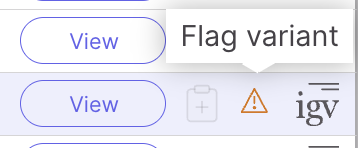
* **Mark variant as artifact** — capture a known assay artifact once and have it recognized on every later case for the same test.

  * In the **Variants** page, select a variant and choose **Artifact** from the flag menu, or use the same option on the **Results** page
  * The artifact indicator is shown in the variant grid when the same variant is encountered in subsequent cases for the same test, so the user is immediately aware of its status
  * Artifacts are automatically excluded from report automation

  <figure><img src="https://1917818526-files.gitbook.io/~/files/v0/b/gitbook-x-prod.appspot.com/o/spaces%2FrkSuX7Vmcc4W5JjlZQyx%2Fuploads%2Fgit-blob-d31fa9826f64caaa52ffbf8cf6d9955798590e71%2Fartifact-flag-variant-icon.png?alt=media" alt=""><figcaption><p>Flag variant icon in the variant grid</p></figcaption></figure>

  <figure><img src="https://1917818526-files.gitbook.io/~/files/v0/b/gitbook-x-prod.appspot.com/o/spaces%2FrkSuX7Vmcc4W5JjlZQyx%2Fuploads%2Fgit-blob-451257d30c537f92a8aab697b5876969f7c5ec92%2Fartifact-flag-menu.png?alt=media" alt="" width="220"><figcaption><p>Artifact option in the flag menu</p></figcaption></figure>
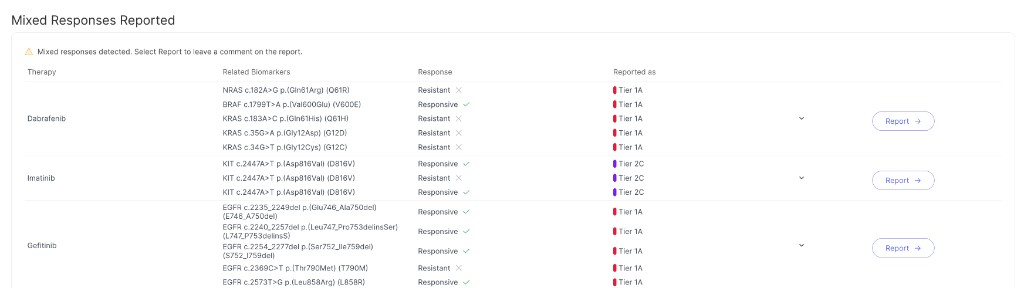
* **Mixed Responses Reported** — surface contradictory evidence before it reaches the report, rather than leaving it to be caught during review.

  * When a case has multiple reported assertions for the same therapy with conflicting direction values (for example, Responsive and Resistant), Connected Insights now shows a **Mixed Responses Reported** panel at the top of the **Results** page, with the message "Mixed responses detected"
  * For each affected therapy, the panel lists the related biomarkers, each biomarker's response, and the tier it was reported as
  * Select **Report** next to a therapy to leave a comment on the report that addresses the conflict

  <figure><img src="https://1917818526-files.gitbook.io/~/files/v0/b/gitbook-x-prod.appspot.com/o/spaces%2FrkSuX7Vmcc4W5JjlZQyx%2Fuploads%2Fgit-blob-2225ce9909bee213cbc801de20f556ae538869d1%2Fmixed-responses-reported.png?alt=media" alt=""><figcaption><p>Mixed Responses Reported panel on the Results page</p></figcaption></figure>
* **Allow users to enter tumor purity and ploidy, and calculate copy number based on user entered purity** — apply your lab's own tumor model so copy number reflects the sample you actually sequenced.

  * Users can enter a lab-derived tumor purity value in the Results tab, in a new **Tumor Model** section
  * Connected Insights recalculates absolute copy number for all copy number variants and displays the values in the variant grid; allows filtering and sorting on the recalculated values and inclusion of the values in the report
  * Users can view the original CN value using Format/CN column in variant grid

  <figure><img src="https://1917818526-files.gitbook.io/~/files/v0/b/gitbook-x-prod.appspot.com/o/spaces%2FrkSuX7Vmcc4W5JjlZQyx%2Fuploads%2Fgit-blob-b0d6a441c95e02c4141fa7428aca49467d970f5d%2Fimage%20(39).png?alt=media" alt=""><figcaption><p>Tumor Model section on the Results page</p></figcaption></figure>
* **Expanded gene-fusion support** — fusions are recognized in more genomic contexts, and consequences are resolved per transcript pair.
  * Fusions where the breakpoint lies upstream or downstream of the canonical gene boundary will be recognized as gene fusions and annotated accordingly
  * Inframe and frameshift consequences will be correctly tied to each RNA fusion transcript pair in the transcript details
* **Therapies of interest** — report on the therapies your practice follows, not only FDA-approved targeted therapies.
  * Users can upload a per-workgroup list of curated therapies in report automation configuration through the API (for example, NCCN-guideline therapies that are not FDA-approved targeted therapies)
  * Variant details indicate whether an assertion involves a therapy of interest
  * Report automation can be configured to include these therapies alongside standard FDA-approved therapies
* **AI Literature Evidence (Beta Feature)** — bring the most relevant functional literature to the variant, instead of searching PubMed separately.

  * Powered by Illumina LiteratureAI, the **Literature Evidence** panel on the Variant Detail page searches PubMed for papers most relevant to the function study of oncogenic effect of the mutation
  * The panel shows the total number of relevant papers, how many suggest the variant is oncogenic, and per-paper details including title, authors, publication date, and citation count
  * Only supports small variants in this release, and not all small variants have supporting papers

  <figure><img src="https://1917818526-files.gitbook.io/~/files/v0/b/gitbook-x-prod.appspot.com/o/spaces%2FrkSuX7Vmcc4W5JjlZQyx%2Fuploads%2Fgit-blob-4f8515ea1d9a687dfb388056a94fda2de4296f78%2Fimage%20(42).png?alt=media" alt=""><figcaption><p>AI Literature Evidence panel on the Variant Detail page</p></figcaption></figure>

## Enhancements

### General UI

* Illumina Connected Analytics (ICA) references have been rebranded to Illumina BioInsight Platform Core throughout the user interface
  * The service is referred to as Illumina BioInsight Platform Core on first mention, and as Platform Core or Core thereafter
  * This is a terminology change only; no configuration, integration, or workflow changes are required

### Cases and Ingestion

* Allow users to add multiple expression results for the same gene from different source methodologies, such as IHC and FISH, by specifying a source label to distinguish them
* DRAGEN SV VAF will be more accurate by utilizing breakend-specific read metrics available in DRAGEN 4.3 and later
* Variants are no longer excluded from ingestion because of a low supporting-read count; every called variant is ingested and review decisions are left to the user
  * A variant is treated as present in the sample unless its genotype (GT) is 0 or 0/0, regardless of supporting reads
  * For tumor-normal cases, a variant is treated as absent from the normal sample, and its Predicted Origin is Somatic, when it is tagged SOMATIC, its normal-sample GT is 0 or 0/0, or the normal sample has no supporting reads for the alternate allele

### Variant Review and Interpretation

This release adds more ways to bring your own evidence and scoring standards into review, and more of the underlying VCF data into the variant grid.

* Allow users to view and filter sample metrics from VCF FORMAT fields
  * Phasing information fields such as `GT` and `PS` are now available for workflows that provide them
* Allow users to filter and sort variants by REVEL score
  * The REVEL missense-pathogenicity score can be added as a column in the variant grid and used as a filter condition
* For DRAGEN TSO 500 Solid and DRAGEN TSO 500 ctDNA, the fusion sequence, including any inserted intronic sequence at the breakpoint, is now available in the Variants and on the Variant Details page via the `INFO/CONTIG` field
* Allow users to customize oncogenicity prediction rules — contact Illumina technical support to set up a custom oncogenicity scoring configuration for your workgroup
* Provide ESMO ESCAT as a selectable actionability framework, in addition to the default AMP/ASCO/CAP standard
* Assertion classification shows a "None (i)" tooltip explaining how the final classification was derived, including when the result is None
* Allow reporting a Therapeutic, Prognostic, or Diagnostic assertion using the "Oncogenic Variant" consequence, alongside Gain-of-Function, Loss-of-Function, and the variant's own consequences

### Knowledge Base and Assertions

Evidence matching is more consistent across sources and reaches variant classes that previously went unmatched.

* Therapy direction labels are now standardized across all knowledge bases. New direction values added: Decreased Response, Resistant, Conflicting, No Impact, and Unknown. See [Actionability](/connected-insights/interpret-and-report/viewdetails-introduction/viewdetails-actionability.md) for the complete list of direction values and how each source's original value maps to them
* Better support for rearrangements, partial tandem duplications, and HLA allele assertions from OncoKB and CKB
* Add support for OncoKB germline assertions — germline-origin variants classified as pathogenic or likely pathogenic will match and display OncoKB germline-specific therapeutic and prognostic evidence
* Refined off-label evidence tiering for CKB and CIViC — off-label assertions are now ranked based on whether the evidence applies to the same broad cancer category (solid tumor or hematologic) as the case's disease, consistent with how OncoKB off-label evidence was already handled
  * Cross-category assertions (a solid tumor Tier 1A assertion shown in a hematologic case, or a hematologic Tier 1A assertion shown in a solid tumor case) do not have an assigned tier and are not added to the draft report by report automation
  * Off-label assertions within the same disease category (for example, a solid tumor Tier 1A assertion shown in a different solid tumor case) are shown at Tier 2C
  * See [Actionability](/connected-insights/interpret-and-report/viewdetails-introduction/viewdetails-actionability.md) for how on-label and off-label evidence is tiered
* Improved FLT3-ITD evidence matching — FLT3 ITD variants reported as structural variants now correctly match and display FLT3-ITD evidence from knowledge bases

### Configuration

Configuration becomes more granular per assay, and cloud workflows require less maintenance as new pipeline versions are supported.

* Allow users to configure test-specific disease configuration
  * Users can override the disease configuration at the test definition level, enabling different settings per assay — for example, separate TMB cutoff thresholds for solid tumor vs. liquid biopsy tests
* Cloud workflow configuration
  * Workflow configuration now displays which Platform Core pipeline and Platform Core projects are being monitored for auto-pickup
  * When Connected Insights adds support for a new DRAGEN patch release (for example, v4.3.11), it is registered to existing cloud workflows for that pipeline (for example, v4.3) automatically. Previously, the workflow had to be recreated before the newly supported patch release could be used for auto-pickup.

### Reporting

Report authors gain a more flexible JSON schema and richer formatting, while report automation covers more of the case.

* Increased the default limit on the number of variants report automation will include in the report from 75 to 300
* Report automation changes:
  * The "only report previously reported assertions" option no longer applies to My Knowledge Base assertions or Oncogenicity Prediction; both are always considered for report automation, so they can be reported together with previously reported assertions from other knowledge bases
  * RNA fusion variants are prioritized over DNA structural variants when both are present for the same gene fusion
* Add Rich Text Format (RTF) support in Interpretation Summary in report
  * Users can use Bold, Italic, Underline, Bullet Point List and Numbered List formats in the Interpretation Summary
  * Formatted text is rendered in the PDF and DOCX report only when the report uses a Report Template provided in this release; existing Report Templates render the text unformatted
* Report JSON enhancements
  * HGNC ID is now included for each gene object in the clinical report JSON
  * Clinical trial distance (miles and kilometers) is now included in the report JSON
* Report Templates can now be built against a new report JSON v2 format, which supports more flexible report customization (for example, referencing report objects directly on a variant instead of only through its biomarker). Report Templates provided in this release use report JSON v2; existing Report Templates continue to use v1. Connected Insights automatically generates the report using whichever JSON version the case's Report Template is built for, so existing v1 Report Templates keep working unchanged
  * See [Report APIs](/connected-insights/resources-and-references/a-introduction/a-report.md) for how to pull the report JSON via API

### Visualization

Visualization supports more file formats and data sources, and gives you more control over what is displayed.

* DRAGEN Amplicon DNA analyses now display a coverage track in Genome View
* Support visualization of logR coverage tracks
  * Tangent-normalized and logR ratio coverage files are available as selectable data sources in the visualization track settings
* Visualization improvements
  * CRAM and CRAI files are now supported in place of BAM and BAI for all visualization contexts including coverage plots, read visualization, and IGV
  * Users can toggle individual tracks on or off and reorder them using the track settings panel

    <figure><img src="https://1917818526-files.gitbook.io/~/files/v0/b/gitbook-x-prod.appspot.com/o/spaces%2FrkSuX7Vmcc4W5JjlZQyx%2Fuploads%2Fgit-blob-1b140d51e54b61ca17c8f9cc460e3b9b56b5c17a%2Fvisualize-details-configure.png?alt=media" alt=""><figcaption><p>Configure Tracks dialog</p></figcaption></figure>
* Various read visualization improvements including improved coverage display, larger B-allele ratio plot with hover values, and better key gene handling
* Longitudinal tracking improvements
  * The longitudinal plot uses a time-based x-axis for a more accurate representation of the rate of change between cases
  * Users can override the **Analysis Date** in case detail when uploading past data

## Defect Repairs

The following defects reported in earlier releases are resolved in 5.5.

### Cases and Ingestion

* Opening a case in a new tab or window using a modifier key (for example, Cmd/Ctrl-click) now works as expected. (4445)
* Ingesting a WGS v4.2 cloud analysis that uses a BAM file as input no longer fails with a 500 internal error. (6199)
* Corrected the case-creation template for WGS tumor-normal analysis so tumor and normal samples use one consistent Subject ID per case. (10807)
* When upload analysis via the ici-uploader, cases missing required files are now handled correctly and the missing files are surfaced. (11122)
* Uploading a large VCF file now completes successfully instead of failing with an error. (11841)
* A case can now be created from a VCF file that contains only a header and no variants, and IHC biomarkers can be added to it. (12101)
* Changing the gene coverage threshold in the pipeline configuration is now reflected in the coverage plot when a case is reprocessed or its disease is changed. (12113)
* A multi-sample cloud analysis ingestion no longer rolls back every sample in the analysis when only one sample fails. (12363)
* Gene-level biomarkers can now be added to a case without specifying a source. (12729)
* Adding several gene-level biomarker results for the same gene from different sources (for example, PD-L1 IHC results from four antibody clones) no longer causes case ingestion to fail. (12961)
* Audit log entries for the `file.metadata.processed` event now record the entity type as `Case` instead of `CASE`. (12928)
* Custom case data now appears in a consistent location within Case Details across cases, rather than shifting position between cases. (12933)
* A case with a complex default variant filter configuration now ingests successfully. (12980)
* The Case List now loads faster. (13060)
* Adding or updating a case's participants or tags is now recorded in the audit log with full detail; previously these actions were missing or lacked participant/tag information. (13166, 13316)
* For DRAGEN TruSight Oncology 500 v2.6.2, QC metric values are now displayed correctly for single-sample (DNA-only or RNA-only) analyses. (13205, 13610)
* A user with the Case Manager role can now import an analysis from Platform Core. Creating the workflow itself still requires the Lab Director role. (13700, 13774)

### Variant Review and Interpretation

* "My Knowledgebase" is now spelled consistently as "My Knowledge Base". (10570)
* Pinning a column to the right in the variant grid no longer shifts the "Reported" section out of place. (10859)
* Variant grid rows no longer stay highlighted after the cursor moves away. (11062)
* Fixed several issues with Actionability filters in the variant filter editor: combining Actionability with a Biological Classification or Variant Category filter could duplicate or incorrectly modify the Actionability selections, editing a filter with multiple Actionability filters across different OR clauses and applying it could crash the page, and a saved filter's previously selected Actionability/Biological options were not restored when reopened for editing. (11086, 11609, 13024)
* Marking a variant as a co-occurring biomarker in the assertion form now shows a clear indication when a biomarker is not applicable, instead of leaving it ambiguous. (11909)
* Clearing the Karyotype value on the Results page no longer leaves the page stuck on "Saving". (11980, 12994)
* The CGC (Cancer Gene Census) exclude filter now correctly applies to RNA fusion variants. (11949)
* Lab Frequency counts now update correctly for variants with a "." FILTER value. (11964)
* Review status is now set correctly for variants matched by a case's default filter. (12024)
* When a filter combined more than one criterion that relies on annotation metadata (for example, both Actionability and Biological), some of that metadata was dropped from the results; all selected metadata is now retained. (12698)
* The transcript can no longer be changed on a completed case. (12742)
* The HRD value entered for a new assertion on an HRD biomarker is now shown in the Knowledge Base table, for both My Knowledge Base and CKB assertions. (12735)
* Selecting multiple biomarkers on the Variants page now updates the selection count and opens Variant Details as expected. (12745)
* Reporting an oncogenicity prediction now works for a variant whose selected transcript has only a DNA- or nucleotide-level change (no protein-level HGVSp); previously the Report button stayed disabled with no indication why. (12801)
* Saving a Biological or Diagnostic assertion as "Pending Approval" no longer unexpectedly returns the user to the case list, requiring the case to be reopened to continue. (12818)
* Oncogenicity prediction assertions now apply proper protein-change (HGVS p.) validation when a consequence is selected. (12873)
* After a disease update, a manually added variant continues to display its "Manually added variant" tag; previously the tag could disappear from the variant's details even though the variant itself remained in the case. (12930)
* When the last case using a tag is deleted, the tag is now removed from the tag list; it can still be re-created later under the same name if needed. (12955)
* The oncogenicity prediction scale now updates to match the classification when the transcript is changed on the variant details page, instead of continuing to show the previous transcript's value. (12988)
* Fixed an issue in report automation's assertion-prioritization logic for assertions with co-occurring biomarkers, where a less specific assertion could be selected over the correct one; an assertion with only one required biomarker also no longer incorrectly groups unrelated variants together on the report. (13045)
* Editing an assertion no longer loses text typed into the notes field when the transcript button is clicked. (13065)
* Exported fusion calls (TSV) now include the affected exon for both fusion partners, matching what the variant grid shows; previously only one partner's exon was exported. (13107)
* Variant filters using an INFO attribute declared in the VCF header now work even when no ingested variant carries that field. (13346)
* Changing the sort order on a preconfigured filter tab now preserves the variant grid's column layout (order, widths, and pinned columns). (13469)
* Copying a multi-biomarker assertion from an external knowledge base (including a TMB, MSI, or HRD signature biomarker) to the report now correctly copies all of the assertion's biomarkers, not only the first one. (13629)
* Adding and then removing a variant flag on the Results page no longer causes the variant to disappear from the page. (13772)
* While a case is processing after an assertion update or virtual variant processing, the Cases link is no longer blocked, so you can navigate to the Case List. (12874)
* Fixed a display issue in the transcript selection dialog on the variant details page. (14114)

### Knowledge Base and Assertions

* Tier 1A KMT2A rearrangement evidence is now matched for the KMT2A-PTD (partial tandem duplication) variant. (10660)
* Fixed several issues where a Resistant therapeutic assertion was missing its approval authority (FDA and/or NCCN) despite qualifying evidence — affecting certain CKB multi-biomarker assertions and OncoKB Level R1 assertions. If report automation was configured to include only FDA- or NCCN-approved therapies, these resistance findings could be silently omitted from the report. (11905, 13880, 14049)
* A multi-biomarker assertion that requires a specific mutation type for one of its biomarkers (for example, a "KEAP1 mutant" biomarker) no longer incorrectly matches a case that does not actually have a qualifying variant for that biomarker. (12017)
* Changing a disease name on a knowledge base association is now applied to the existing assertion, instead of leaving the previous name attached. (13325)
* A case with HR-positive, HR-negative, or HER2-negative breast cancer now matches knowledge base evidence curated against the corresponding Disease Ontology terms. Previously these terms did not map to each other, so applicable evidence — including Tier 1A — was missed for these common breast cancer subtype. (12535)
  * Hormone receptor positive malignant neoplasm of breast (SNOMEDCT:417181009) now matches estrogen-receptor positive breast cancer (DOID:0060075) and progesterone-receptor positive breast cancer (DOID:0060077)
  * Hormone receptor negative malignant neoplasm of breast (SNOMEDCT:1388692009) now matches estrogen-receptor negative breast cancer (DOID:0060076) and progesterone-receptor negative breast cancer (DOID:0060078)
  * Human epidermal growth factor 2 negative carcinoma of breast (SNOMEDCT:431396003) now matches Her2-receptor negative breast cancer (DOID:0060080)

### Configuration

* Countries pasted into the Clinical Trials section of report automation configuration are now added as individual chips as expected. (11849)
* The system now supports saving more complex variant filters; previously a filter with a very large number of criteria could fail to be created. (13202)
* Selecting and deselecting a custom annotation in the test definition form now works as expected; previously a deselected file stayed selected and the same file could appear more than once. (12929)
* The Help link in the application header now opens the User Guide instead of the release notes. (13287)

### Reporting

* Report generation performance is improved; retrieving the knowledge base source versions included in the report no longer causes a long delay. (13025)
* Opening the Report tab for a large report is now significantly faster and uses less browser memory. (13039)
* A deleted (blank) Interpretation Summary now stays deleted; previously reopening the case or Report tab reverted it to the last non-blank summary. (13354)
* The createdSystemVersion field is now populated in the clinical/report JSON. (12828)
* The variant object's `id`, `creationDate`, `updateDate`, `createdBy`, `updatedBy`, `domainId`, `nodeId`, and `projectId` fields are no longer null in the report JSON; they now carry the same values as in the clinical JSON. (12958)
* Clinical trial associations shared across co-occurring (multi-biomarker) variants are now correctly grouped into the `findingsByClassification` section of the report JSON. (13843)

### API and Data

* The variant export API now works with API key authentication, not only a short-lived session token, making it easier to integrate into automated workflows. (12216)
* Requesting a draft report for an archived case now triggers restore cleanly instead of returning a server error. (12819)
* The case tags API now returns a correct success response body instead of a misleading "unable to parse JSON" message. (13022)

### Visualization

* For a case originally processed before 5.3, changing the case's disease now reports low-coverage regions for all genes in the new disease's gene list, not only the genes the change newly added. Cases processed on 5.3 or later were not affected. (11904)
* Updating a disease configuration now takes effect on existing cases through reprocessing; key-gene coverage is shown for the newly added genes. (10878)
* The tumor DNA BAM track is now shown in variant details for merged tumor-normal DNA and RNA cases. (10828)
* Non-PASS CNVs are now plotted in gray in the whole-genome and biomarker details visualizations. (10809)
* The small-variant track in Genome View no longer over-plots coverage for a single-VCF upload that contains reference-call records. (11733)
* In the Visualize tab, the "Filter: PASS" plot filter now includes variants with a FILTER value of "." as expected. (11960)
* Default transcripts are now shown in bold at the top in the variant details visualization. (11970)
* The squished read-pairs view now renders correctly after toggling the "Read pairs" option. (12417)
* Variant visualization now reads valid alignment files that previously failed to load, with improved on-screen error handling when a file cannot be read. (12790)
* Fusion transcript visualizations now show the correct default reference-sequence direction for each breakend. (13013)
* Non-PASS CNV deletion calls are no longer mislabeled as copy-number neutral. (13046)
* Fusion variant visualization now shows the amino-acid number when zoomed in. (13674)

### Localization

* Corrected several missing or incorrect translations, including newly added variant grid columns, case deletion messages, Genome View labels, and the "Showing xxx of yyy variants" message. (6051, 6102, 10919, 12031, 12035)

## Known Issues

The following issues are known in this release. Where a workaround is available, it is noted with the issue.

### Variant Review and Interpretation

* A large copy-number variant spanning many genes can match gene-level "Oncogenic Variant" therapeutic assertions for genes in the affected region, even when the case has no oncogenic biological assertion for those genes. This can surface therapies whose evidence is for gain of function (mutation or amplification) on a case that has a copy-number loss. Review therapeutic assertions matched to large copy-number variants before reporting. (12810)
* The Transcript Position shown in the variant grid may not match the value selected on the transcript selection page. (14384)
* Marking a structural-variant (non-translocation) variant as an artifact does not also mark other variants in the case that overlap it by 95% or more (reciprocal overlap). (14894)
* For cases ingested before 5.3, co-occurring assertions that include more than one signature (genome-wide) biomarker are not returned in association search. (14884)
* CNV calls from a single tumor-normal VCF can carry inconsistent origin labels (some "predicted germline", others "suspected somatic") for WGS Solid Tumor-Normal analyses. (10639)
* For a structural-variant deletion, the variant grid and the exported variant TSV can show a simplified position/reference/alternate allele (for example, an `<DEL>` alternate allele) instead of the explicit sequence from the source VCF. The Variant Details page is not affected and always shows the correct values. (14448)

### Visualization

* The base counts shown in the variant details read-alignment view can differ from those shown in IGV at a variant position. (12852)

### Knowledge Base and Assertions

* Clinical trials from countries outside those selected in report automation configuration may still appear on the report (for example, Australia when only European countries are selected). (11927)
* MSI multi-biomarker clinical trials from CKB may not be fully available in Connected Insights. (12015)
* Some CKB therapeutic assertions for the TMB biomarker are not available in Connected Insights. (12759)
* On a signature biomarker's Variant Details page, changing the status filter to a status different from the biomarker's own (for example, HRD-positive) can hide matching CKB clinical trials, including trials with an Unknown recruitment status and trials whose indications come from the CKB Clinical Trials Database. (14155, 14156)

### Configuration

* Workflow/pipeline configuration YAML validation does not catch every invalid value (for example, an unsupported placeholder token, or a field nested under the wrong section); an invalid configuration can be accepted without an error. (9856)
* When a saved variant filter includes a criterion that is not compatible with the case being viewed (for example, a sample metric or VCF INFO attribute not present in that case), the incompatible criterion is silently dropped instead of showing an error. (13233)

## Product Limitations

The following limitations apply to this release.

### Variant Review and Interpretation

* Uploading a preferred transcript list does not verify that each transcript belongs to the gene it is associated with. (5133)
* The SpliceAI score is computed per transcript but is shown and applied at the gene level; variants with multiple transcripts may not reflect the score for the transcript you are reviewing. (6200)
* OncoKB and CKB may choose different default transcripts for the same variant, so the transcript shown can differ between knowledge-base sources. (7336)
* Selecting "None" in a Biological or Actionability filter may not exclude variants the way other filter values do. (9926)
* For cases ingested in 4.0, 5.0, and 5.1, numeric quick-filter fields (for example, Tumor VAF or Read Depth) do not offer dropdown suggestions, and selecting a suggested example such as "< 0.5 Tumor VAF" returns an error. (12023)
* A fusion without a Nirvana "inframe" annotation can be shown with an Inframe unidirectional gene fusion consequence. (11151)

### Knowledge Base and Assertions

* Genome equivalence (matching the same assertion across GRCh37 and GRCh38) is not supported for nucleotide-level assertions. (3451)
* COSMIC frequency and occurrence data can be inconsistent for some variants across the variant grid and variant details. (6584)
* Some CKB clinical trials for CD274-positive disease are not available in Connected Insights. (12771)
* Some annotation transcript IDs are outdated and their transcript links do not resolve at NCBI. (14724)
* When a knowledge base's classification for a variant is inferred from a similar variant or from the variant's position in a hotspot, rather than curated for that specific variant, Connected Insights does not match it to the variant. For example, OncoKB reports BRCA1 R71M as Likely Oncogenic on the basis of BRCA1 R71G, so no OncoKB biological classification or associated findings are shown for R71M in Connected Insights. This is intentional: current oncogenicity guidelines do not treat variant similarity or hotspot location as sufficient evidence on their own. See [Biological Classification Assertions](/connected-insights/interpret-and-report/viewdetails-introduction/viewdetails-biological-classification-assertions.md) in the user guide. (13076)

### Visualization

* For some genes such as ESR1, the coverage plot may use a different transcript than the one displayed for the variant. (5491)
* In the IGV viewer, read order in the BAM track can change after zooming, and the SV track can show only one SV when several are present at the same locus. (1298, 5494)

### Reporting

* Reopening an approved report does not notify reviewers that associated assertions were updated. (3934)
* Retrieving a report can fail if the report service has already initialized the case-report record under certain timing conditions. (5263)
* Rerunning report automation without updating assertions can leave the assertions added to the report out of sync with the assertions shown in variant detail, for a case ingested from a previous release. (11900)

### API and Data

* The structural variant caller can also call insertion, deletion, or delins events that the small variant caller has already reported. Those overlapping calls appear as duplicate variants in the Variants page. Opening variant details or visualization for either copy can display the other copy instead of the one you selected. (3723)
* After the Ontology NV 29 update, some genes and transcripts are not returned because of a change in feature-type classification. (3777)

## **Revision History**

| Version | Description of Change |
| ------- | --------------------- |
| 00      | Initial Release       |


---

# Agent Instructions
This documentation is published with GitBook. GitBook is the documentation platform designed so that both humans and AI agents can read, navigate, and reason over technical content effectively. Learn more at gitbook.com.

## Querying This Documentation
If you need additional information that is not directly available in this page, you can query the documentation by asking a question.

Perform an HTTP GET request on the following URL with the `ask` and `goal` query parameters:

```
GET https://help.bioinsight.illumina.com/connected-insights/resources-and-references/rar-release-notes/5.5-release-notes.md?ask=<question>&goal=<user_goal>
```

`ask` is the immediate question: it should be specific, self-contained, and written in natural language.
`goal` is what the user is ultimately trying to achieve, the reason they need the answer. Sharing it helps GitBook give you a better, more relevant answer. A goal is most helpful when it describes the outcome the user wants rather than restating the question. For example, with `ask=how do I create an API token`, a goal like `automate deployments from our CI pipeline` lets GitBook tailor the answer to that use case.

The response will contain a direct answer to the question and relevant excerpts and sources from the documentation.

Use this mechanism when the answer is not explicitly present in the current page, you need clarification or additional context, or you want to retrieve related documentation sections.