> For the complete documentation index, see [llms.txt](https://help.bioinsight.illumina.com/llms.txt). Markdown versions of documentation pages are available by appending `.md` to page URLs; this page is available as [Markdown](https://help.bioinsight.illumina.com/connected-insights/interpret-and-report/cm-overview-tab.md).
# Results / Overview Tab
{% tabs %}
{% tab title="Results (5.3+)" %}
The **Results tab** is your command center for insights! It delivers a clear, high-level snapshot of the most critical findings - like **variants, TMB, MSI, and HRD** - so you can zero in on what matters most. You'll also spot any **quality control alerts** (think run performance, sample integrity, or gene coverage that needs a closer look) and track **case interpretation progress at a glance** - see which findings are already reviewed and which are waiting for your attention. Everything you need, all in one streamlined view!
### Disease
This section displays the disease for the case.
### Case Interpretation Progress
Track your progress with ease. This section shows exactly where you stand in reviewing case findings. A dynamic progress bar gives you instant visual feedback, while the toggle lets you switch between **Needs Review** and **All** to focus on what matters most. Stay in control and keep your workflow moving forward.
A finding is considered reviewed if it has been opened or has been automatically reported according to [Report Automation](/connected-insights/configure/configuration/c-automation.md).
### Lab QC
This section gives you a quick, at-a-glance overview of key quality metrics under the [Lab QC tab](/connected-insights/interpret-and-report/cm-lab-qc-tab.md), including:
* Metric - What's being measured
* Value - The actual result
* Status - Pass or fail
Want to customize what appears here? For details on configuring metrics and setting thresholds, check out [Pipeline and QC Configuration](/connected-insights/configure/configuration/c-pipeline-and-qc-configuration.md).
### Classification & Risk Stratification Prediction
For more information, refer to [Classification & Risk Stratification Prediction](/connected-insights/interpret-and-report/cm-overview-tab/classification-and-risk-stratification-prediction.md).
### Karyotype
**Karyotype**
The Karyotype section lets you provide detailed chromosomal information in **ISCN format**, supplementing sequencing results for [Classification & Risk Stratification Prediction](/connected-insights/interpret-and-report/cm-overview-tab/classification-and-risk-stratification-prediction.md). Built-in validation ensures your entries are error-free, helping you catch and correct manual mistakes instantly.
Example:
```
48,XX,+3,+5,t(9;22)(q34;q11.2)[20]/47,XX,+3,t(9;22)(q34;q11.2)[5]
```
The Karyotype secton does not appear on the Results page by default. To add a Karyotype, use the "+" icon towards the upper right of the interface, and select "Add Karyotype".
## Monitoring
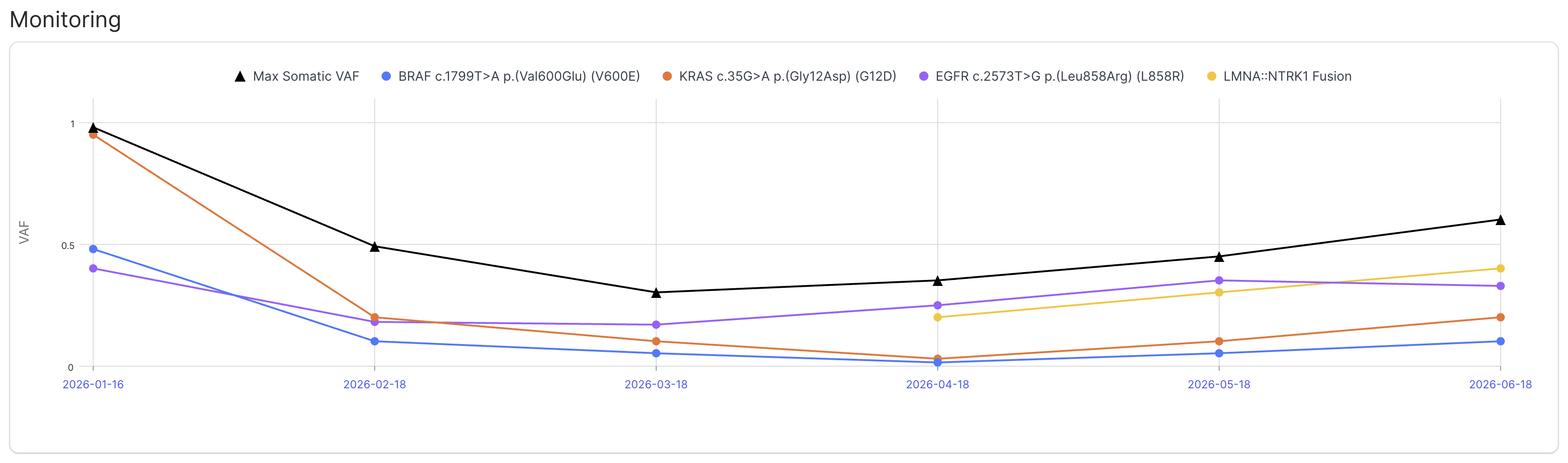
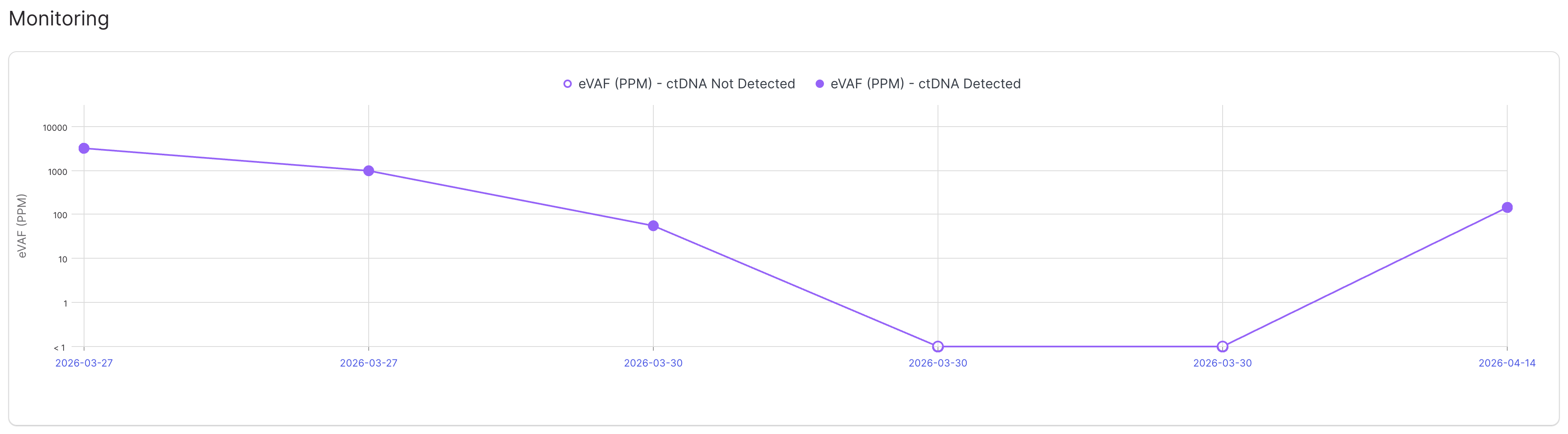
This section displays a longitudinal plot of variant allele frequency (VAF) for variant detection cases and estimated variant allele frequency (eVAF) for MRD detection cases.
For variant detection cases, the max somatic VAF and VAF of each monitored variant is plotted for each case for the associated subject. If the given pipeline produces max somatic VAF that value is recorded, otherwise the maximum VAF among small variants with FILTER = PASS and Predicted Origin = Somatic is recorded instead.
Select a variant to monitor by clicking the flag icon and selecting **Monitor Variant**. See [Variant Grid Columns - Reported - Flags](/connected-insights/interpret-and-report/inter-variant-grid.md#variant-grid-columns) for more details on how to monitor a variant for a subject.
For MRD detection cases, the eVAF (in PPM) is plotted for each case for the associated subject. Each data point is marked based on whether ctDNA was detected or not detected for that case.
## Signatures
This section showcases the key biological markers that drive interpretation, all sourced from secondary analysis files and displayed for quick reference.
For variant detection cases:
* Tumor Mutational Burden (TMB) - Displays the TMB in **mut/MB**, along with **TMB-Low** or **TMB-High** status.
* Microsatellite Instability (MSI) - Displays the MSI as **percent unstable sites** (e.g., TSO 500) or **sumJSD** (e.g., TSO 500 ctDNA), plus **MS-Stable** and **MSI-High** statuses.
* Homologous Recombination Deficiency (HRD) - Displays the HRD value, along with **HRD-Low** and **HRD-High** statuses.
For whole genome T/N cases, we take it a step further: related mutations signatures are displayed right next to each relevant biomarker - for example, **ID1 and ID2 signatures appear alongside MSI** - giving you deeper insight into the underlying genomic patterns.
Want to fine-tune biomarker thresholds? Head to [Disease Configuration](/connected-insights/configure/configuration/c-disease-configuration.md).
For MRD fingerprint cases: the timestamp and status of the MRD fingerprint are shown:
For MRD detection cases: the MRD score, eVAF, and ctDNA detected/not detected status are shown:
> If the associated MRD fingerprint case for an MRD detection case is ingested in the system a link to the MRD fingerprint is provided.
Ready to dive deeper? Click **Review** or **View** to explore biomarker details. For step-by-step guidance, see [Interpret a Biomarker](/connected-insights/interpret-and-report/inter-interp-a-variant.md).
### Tumor Model
Get a clear picture of your sample with **Estimated Tumor Purity (%)** and **Estimated Tumor Ploidy**, algorithmically estimated by certain DRAGEN pipelines. These metrics help you understand the complexity and composition of the tumor for interpretation.
You may manually enter Tumor Purity (TP) based on histologic or other methods, either in the absence of an algorithmically estimated value or to override that value. This will recalculate, based on fold change (FC), the copy number (CN) values for all CNV calls displayed in the Results and Variants pages, on each CNV call's Biomarker Details page, and on any report configured to show the CN value. The recalculation assumes a diploid state and uses the formula:
CN = \[(200 × FC) − 2 × (100 − TP)] / TP
for autosomes, PAR regions of sex chromosomes, and female chr X, where FC is fold change and TP is tumor purity (%), and:
CN = \[(100 × FC) − 1 × (100 − TP)] / TP
for male chr X and male chr Y. Note that sex chromosome CN recalculation requires the subject's sex to be specified; if absent but known, sex can be added in the Case Details slide-out.
To modify the Tumor Purity value, select Edit next to the Tumor Model section title. Ploidy can be edited but is only used for display purposes; it is not used in the CN calculation. Only the entered Tumor Purity value will be used. Enter a value between 35 and 100. (This feature is not available for purity estimates below 35%, which are prone to variability and may lead to distorted copy number estimates.) Click Reprocess. Copy number values will be updated for all CNV events represented in the case, and may take a few minutes. Full case reprocessing will not be triggered.
The values for Tumor Purity and Tumor Ploidy indicate their source as User-Supplied or Estimated:
### Disease Genes
This section brings together disease-specific genes, coverage details, and findings for a complete picture.
For more information on how to set up disease-specific genes, refer to [Disease Configuration](/connected-insights/configure/configuration/c-disease-configuration.md).
**Gene Coverage**
Gene coverage visualization shows the following data in a linear plot:
* **Transcript exons and introns** ([preferred](/connected-insights/configure/configuration/c-preferred-transcripts.md), MANE Select RefSeq, or RefSeq Select transcript)
* **Coverage depth** on the y-axis (e.g., 50X) along with [thresholds](/connected-insights/configure/configuration/c-pipeline-and-qc-configuration.md)
* **Hotspots** from [Cancer Hotspots](https://www.cancerhotspots.org/#/home) database
* **Variants** that pass [test filters](/connected-insights/configure/configuration/c-test-definition-setup.md)
When coverage is below the threshold, the specific region is reported automatically as having low coverage, along with any hotspots that fall within the region, and the gene is not reported as a pertinent negative.
**Findings**
Findings - such as variants, HLA alleles, [biomarkers](/connected-insights/resources-and-references/a-introduction/a-case-apis.md#add-biomarkers) (e.g., IHC, FISH) - for each gene are shown with a summary of [Biological Classification](/connected-insights/interpret-and-report/viewdetails-introduction/viewdetails-biological-classification-assertions.md) and [Actionability](/connected-insights/interpret-and-report/viewdetails-introduction/viewdetails-actionability.md) from knowledge bases, such as OncoKB, CKB, CIViC, and MyKB.
To interpret variants from the Overview tab, select **Review** or **View**. For more information, refer to [Interpret a Biomarker](/connected-insights/interpret-and-report/inter-interp-a-variant.md).
Gene expression is also shown in transcripts per million (TPM) if provided by the secondary analysis pipeline (e.g., DRAGEN RNA), which we will enable interpretation of in a future release!
> ❗ TPM is a beta feature for TruSight Oncology 500.
### Other Findings
Other variants passing test filters but **do not appear in a disease-specific gene** are displayed in the Other Findings section.
{% endtab %}
{% tab title="Overview (<5.3)" %}
The Overview tab displays a high-level view of the most relevant variants in the case. This tab contains a list of genes and shows variants detected in that case within those genes. The variants in this list are filtered according to the filter that was selected as part of the test definition. The key genes are predefined by Connected Insights based on cancer type.
### Lab QC
The Lab QC section provides an overview of the following information contained under the Lab QC tab:
* Metric
* Value
* Status (Pass/Fail)
For more information on configuring metrics that display in the Lab QC section and their thresholds, refer to [Pipeline and QC Configuration](/connected-insights/configure/configuration/c-pipeline-and-qc-configuration.md).
### Tumor Characteristics
#### Tumor Content and Ploidy Metrics
View the % Estimated Tumor Purity and Estimated Tumor Ploidy in the Overview tab. This information displays under Tumor Characteristics.
#### Biomarkers
The following biomarkers provide an overview of the measurable biological markers. The content in these fields comes from secondary analysis files and is displayed here.
* **Tumor Mutational Burden (TMB)** — Displays the TMB in mut/MB and TMB-Low and TMB-High statuses.
* **Microsatellite Instability (MSI)** — Displays the MSI as a percentage and MS-Stable and MSI-High statuses.
* **Homologous Recombination Deficiency (HRD)** — Displays the HRD and HRD-Low and HRD-High statuses.
* **Minimal Residual Disease (MRD)** - Displays the timestamp and status of the MRD fingerprint for an MRD fingerprint case and MRD score, eVAF, and ctDNA detected/not detected status for an MRD detection case. If the associated MRD fingerprint case for an MRD detection case is ingested in the system a link to the MRD fingerprint is provided.
For more information on setting thresholds for the statuses, refer to [Disease Configuration](/connected-insights/configure/configuration/c-disease-configuration.md).
Select Interpret to open the biomarker details. For more information, refer to [Interpret a Biomarker](/connected-insights/interpret-and-report/inter-interp-a-variant.md).
#### User Determined Karyotype
Karyotype can be provided in ISCN format and is used for [Classification & Risk Stratification Prediction](/connected-insights/interpret-and-report/cm-overview-tab/classification-and-risk-stratification-prediction.md). Validation is provided to help fix manual errors.
For example,
```
48,XX,+3,+5,t(9;22)(q34;q11.2)[20]/47,XX,+3,t(9;22)(q34;q11.2)[5]
```
### Classification & Risk Stratification Prediction
For more information, refer to [Classification & Risk Stratification Prediction](/connected-insights/interpret-and-report/cm-overview-tab/classification-and-risk-stratification-prediction.md).
### Key Findings
This section provides information on genes specific to the disease, gene coverage, and variants.
**Genes Specific to the Disease**
For more information on how to set up genes specific to the disease, refer to [Disease Configuration](/connected-insights/configure/configuration/c-disease-configuration.md).
**Gene Coverage**
Gene coverage tracks show the following data in a graph:
* **Transcript exons and introns** — Transcript is the preferred transcript (if specified) or the RefSeq transcript. For more information on specifying a preferred transcript for a gene, refer to [Preferred Transcripts](/connected-insights/configure/configuration/c-preferred-transcripts.md).
* **Gene coverage** — The Y-axis indicates the gene coverage (for example, 50X).
* **Hotspots** — Hotspots are plotted along the X-axis and are derived from the Cancer Hotspots website.
* **Variants** — Variants in the gene that pass default filters. For more information on how to set up a default filter, refer to [Test Definition Setup](/connected-insights/configure/configuration/c-test-definition-setup.md).
**Gene Expression**
Gene expression is shown in transcripts per million (TPM) if provided by the secondary analysis pipeline (e.g., DRAGEN RNA).
**Variants**
Variants for each gene are shown with My Knowledge Base, Other Knowledge Base assertions, and the default filters that show the variant.
My Knowledge Base assertions include the following classifications:
* Highest biological classification across all diseases
* Highest actionability classification, including:\
– Therapeutic classifications across case and ancestor diseases\
– Prognostic classifications across the case and ancestor diseases\
– Diagnostic classifications across all diseases
Other Knowledge Base assertions include the following classifications and filters:
* Highest biological classification across all diseases for OncoKB
* Highest actionability classifications for OncoKB, CKB, CIViC, including:\
– Therapeutic classifications across case and ancestor diseases\
– Prognostic classifications across the case and ancestor diseases\
– Diagnostic classifications across all diseases
To interpret variants from the Overview tab, select **Interpret**. For more information, refer to [Interpret a Biomarker](/connected-insights/interpret-and-report/inter-interp-a-variant.md).
{% endtab %}
{% endtabs %}
---
# Agent Instructions
This documentation is published with GitBook. GitBook is the documentation platform designed so that both humans and AI agents can read, navigate, and reason over technical content effectively. Learn more at gitbook.com.
## Querying This Documentation
If you need additional information that is not directly available in this page, you can query the documentation by asking a question.
Perform an HTTP GET request on the following URL with the `ask` and `goal` query parameters:
```
GET https://help.bioinsight.illumina.com/connected-insights/interpret-and-report/cm-overview-tab.md?ask=&goal=
```
`ask` is the immediate question: it should be specific, self-contained, and written in natural language.
`goal` is what the user is ultimately trying to achieve, the reason they need the answer. Sharing it helps GitBook give you a better, more relevant answer. A goal is most helpful when it describes the outcome the user wants rather than restating the question. For example, with `ask=how do I create an API token`, a goal like `automate deployments from our CI pipeline` lets GitBook tailor the answer to that use case.
The response will contain a direct answer to the question and relevant excerpts and sources from the documentation.
Use this mechanism when the answer is not explicitly present in the current page, you need clarification or additional context, or you want to retrieve related documentation sections.

.png?alt=media)
.png?alt=media)
.png?alt=media)
.png?alt=media)
.png?alt=media)
.png?alt=media)
.png?alt=media)


.png?alt=media)
.png?alt=media)
.png?alt=media)
.png?alt=media)
.png?alt=media)