> For the complete documentation index, see [llms.txt](https://help.bioinsight.illumina.com/llms.txt). Markdown versions of documentation pages are available by appending `.md` to page URLs; this page is available as [Markdown](https://help.bioinsight.illumina.com/clarity-lims/library-prep/truseq/truseq-chip-seq-v1.0.md).
# TruSeq ChIP-Seq v1.0
## Protocol 1: TruSeq ChIP-Seq v1.0
Protocol Type = Library Prep
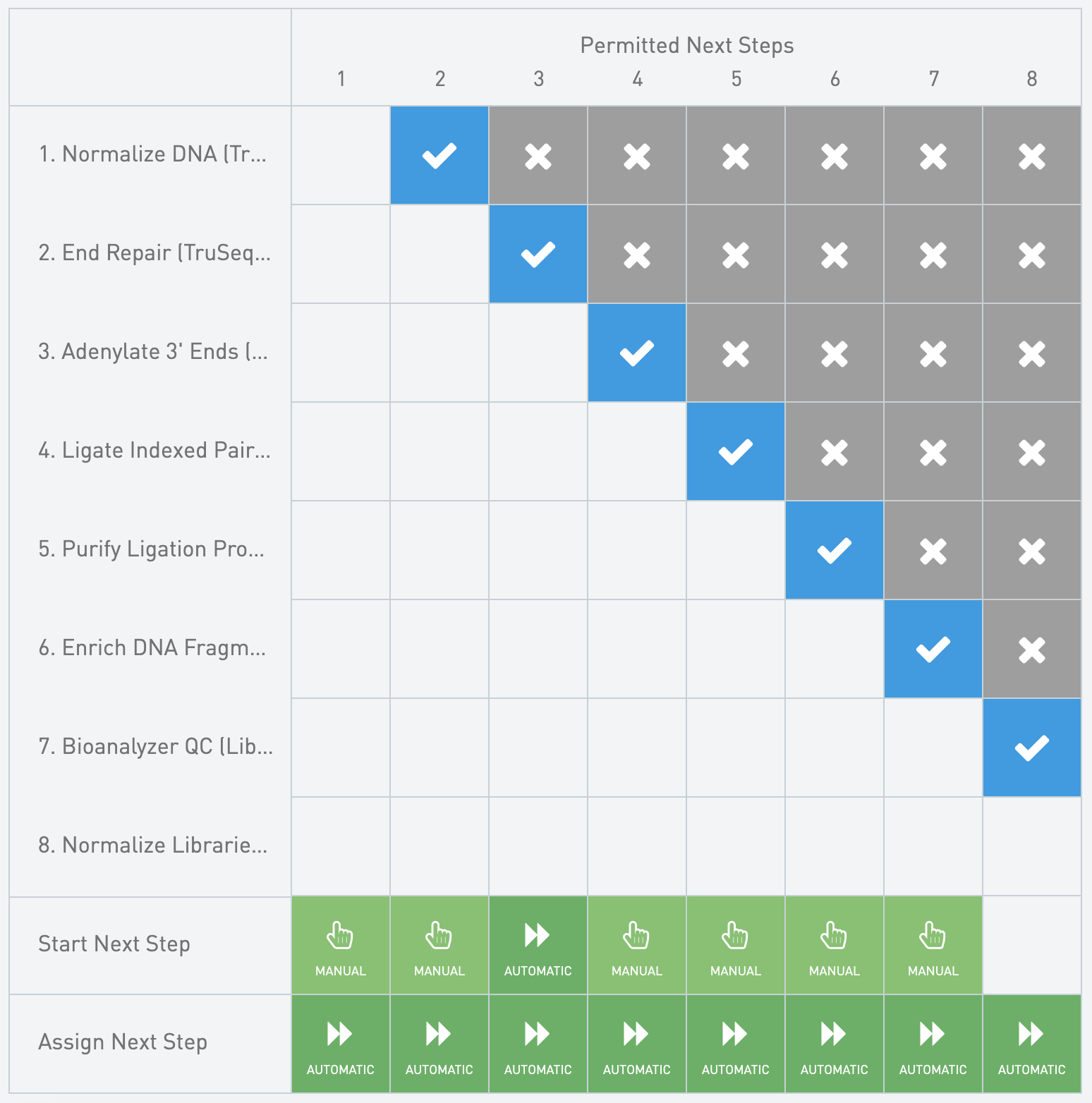
**Next Steps Configuration**
Normalization Calculations
* Trigger Location = Record Details
* Trigger Style = Manual button
{% code overflow="wrap" %}
```markup
bash -l -c "/opt/gls/clarity/bin/java -jar /opt/gls/clarity/extensions/ngs-common/v5/EPP/ngs-extensions.jar -i {stepURI:v2} -u {username} -p {password} script:evaluateDynamicExpression -t true -h false -exp 'output.::Sample Volume (ul):: = (((step.::Input Amount (pg/ul):: / 1000) * step.::Final Volume (ul)::) / input.::Concentration::) ; output.::Buffer Volume (ul):: = step.::Final Volume (ul):: - output.::Sample Volume (ul)::' -log {compoundOutputFileLuid0}"
```
{% endcode %}
Set Next Step - Advance
* Trigger Location = Record Details
* Trigger Style = Automatic upon exit
{% code overflow="wrap" %}
```markup
bash -l -c "/opt/gls/clarity/bin/java -jar /opt/gls/clarity/extensions/ngs-common/v5/EPP/ngs-extensions.jar -i {stepURI:v2} -u {username} -p {password} \
script:evaluateDynamicExpression \
-t false \
-h false \
-exp 'nextStep = ::ADVANCE::' \
-log {compoundOutputFileLuid0}"
```
{% endcode %}
#### Queue/Ice Bucket
* Defaults
* Sample Grouping = Group by Containers
* Well Sort Order = Row
* Sample Table
* Column Headers
| **Category** | **Field Name** | **Field Type** | **Options** | **Additional Options and Dropdown Items** |
| -------------- | -------------- | -------------- | ----------- | ----------------------------------------- |
| Container | Container Name | Built-in | | |
| Container | Well | Built-in | | |
| Derived Sample | Sample Name | Built-in | | |
| Derived Sample | Waiting | Built-in | | |
* Expanded View Fields
| **Category** | **Field Name** | **Field Type** | **Options** | **Additional Options and Dropdown Items** |
| ------------ | ------------------- | -------------- | ----------- | ----------------------------------------- |
| Container | LIMS ID (Container) | Built-in | | |
| Project | Project Name | Built-in | | |
#### Record Details
* Step Data (Master Step Fields)
| **Field Name** | **Field Type** | **Options** | **Additional Options and Dropdown Items** |
| -------------------- | -------------- | -------------- | ---------------------------------------------------------------------------- |
| Comment | Multiline Text | | |
| Final Volume (ul) | Numeric | Required Field | Default = 50 Decimal Places Displayed = 2 Range From 100 to 200 Decimal Places Displayed = 0
* TruSeq ChIP Sample Prep Kit, Box A or B
* Supplier = Illumina
* Catalog Number = 15034288; 15034289
* Website =
#### Automations
Set Next Step - Advance
* Trigger Location = Record Details
* Trigger Style = Automatic upon exit
{% code overflow="wrap" %}
```markup
bash -l -c "/opt/gls/clarity/bin/java -jar /opt/gls/clarity/extensions/ngs-common/v5/EPP/ngs-extensions.jar -i {stepURI:v2} -u {username} -p {password} \
script:evaluateDynamicExpression \
-t false \
-h false \
-exp 'nextStep = ::ADVANCE::' \
-log {compoundOutputFileLuid0}"
```
{% endcode %}
SPB Dilution
* Trigger Location = Not Used
{% code overflow="wrap" %}
```markup
bash -l -c "/opt/gls/clarity/bin/java -jar /opt/gls/clarity/extensions/ngs-common/v5/EPP/ngs-extensions.jar -i {stepURI:v2} -u {username} -p {password} script:evaluateDynamicExpression -t false -h false -exp 'step.::Total Number of Samples:: = step.::Total Number of Samples:: + 1' -log {compoundOutputFileLuid0} && /opt/gls/clarity/bin/java -jar /opt/gls/clarity/extensions/ngs-common/v5/EPP/ngs-extensions.jar -i {stepURI:v2} -u {username} -p {password} script:evaluateDynamicExpression -t false -h false -exp 'if(input.::Target Insert Size (bp):: == 350) { step.::SPB (ml):: = (step.::Total Number of Samples:: * 109.25) / 1000} ; if(input.::Target Insert Size (bp):: == 350) { step.::PCR Grade Water (ml):: = (step.::Total Number of Samples:: * 74.75) / 1000 } ; if(input.::Target Insert Size (bp):: == 550) { step.::SPB (ml):: = (step.::Total Number of Samples:: * 92) / 1000} ; if(input.::Target Insert Size (bp):: == 550) { step.::PCR Grade Water (ml):: = (step.::Total Number of Samples:: * 92) / 1000 } ; output.::Target Insert Size (bp):: = input.::Target Insert Size (bp)::' -log {compoundOutputFileLuid0}"
```
{% endcode %}
#### Queue/Ice Bucket
* Defaults
* Sample Grouping = Group by Containers
* Well Sort Order = Row
* Sample Table
* Column Headers
| **Category** | **Field Name** | **Field Type** | **Options** | **Additional Options and Dropdown Items** |
| -------------- | -------------- | -------------- | ----------- | ----------------------------------------- |
| Container | Container Name | Built-in | | |
| Container | Well | Built-in | | |
| Derived Sample | Sample Name | Built-in | | |
| Derived Sample | Waiting | Built-in | | |
* Expanded View Fields
| **Category** | **Field Name** | **Field Type** | **Options** | **Additional Options and Dropdown Items** |
| ------------ | ------------------- | -------------- | ----------- | ----------------------------------------- |
| Container | LIMS ID (Container) | Built-in | | |
| Project | Project Name | Built-in | | |
#### Record Details
* Step Data (Master Step Fields)
| **Field Name** | **Field Type** | **Options** | **Additional Options and Dropdown Items** |
| ------------------ | -------------- | ----------- | ----------------------------------------- |
| Comment | Multiline Text | | |
| 80% EtOH Prep Date | Date | | |
* Step File Placeholders
* Next Step Log - Automatically attached
* Sample Table
* Sample Display Default = Expand
* Well Sort Order = Row
* Table Columns - Global Fields
| **Category** | **Field Name** | **Field Type** | **Options** | **Additional Options and Dropdown Items** |
| -------------- | ------------------- | -------------- | ----------- | ----------------------------------------- |
| Container | Container Name | Built-in | | |
| Container | LIMS ID (Container) | Built-in | | |
| Container | Well | Built-in | | |
| Derived Sample | Sample Name | Built-in | | |
| Project | Project Name | Built-in | | |
### Step 3: Adenylate 3' Ends (TruSeq ChIP-Seq v1.0)
* Master Step Name = Adenylate 3' Ends v2.0
* Step Type = No Outputs
* Reagent Kits
* TruSeq ChIP Sample Prep Kit, Box A or B
* Supplier = Illumina
* Catalog Number = 15034288; 15034289
* Website =
#### Automations
Set Next Step - Advance
* Trigger Location = Record Details
* Trigger Style = Automatic upon exit
{% code overflow="wrap" %}
```markup
bash -l -c "/opt/gls/clarity/bin/java -jar /opt/gls/clarity/extensions/ngs-common/v5/EPP/ngs-extensions.jar -i {stepURI:v2} -u {username} -p {password} \
script:evaluateDynamicExpression \
-t false \
-h false \
-exp 'nextStep = ::ADVANCE::' \
-log {compoundOutputFileLuid0}"
```
{% endcode %}
#### Queue/Ice Bucket
* Defaults
* Sample Grouping = Group by Containers
* Well Sort Order = Row
* Sample Table
* Column Headers
| **Category** | **Field Name** | **Field Type** | **Options** | **Additional Options and Dropdown Items** |
| -------------- | -------------- | -------------- | ----------- | ----------------------------------------- |
| Container | Container Name | Built-in | | |
| Container | Well | Built-in | | |
| Derived Sample | Sample Name | Built-in | | |
| Derived Sample | Waiting | Built-in | | |
* Expanded View Fields
| **Category** | **Field Name** | **Field Type** | **Options** | **Additional Options and Dropdown Items** |
| ------------ | ------------------- | -------------- | ----------- | ----------------------------------------- |
| Container | LIMS ID (Container) | Built-in | | |
| Project | Project Name | Built-in | | |
#### Record Details
* Step Data (Master Step Fields)
| **Field Name** | **Field Type** | **Options** | **Additional Options and Dropdown Items** |
| ---------------------- | -------------- | ----------- | ----------------------------------------- |
| Comment | Multiline Text | | |
| Thermal Cycler Program | Text | | Default = ATAIL70 |
* Step File Placeholders
* Log File - Automatically attached
* Sample Table
* Sample Display Default = Expand
* Well Sort Order = Column
* Table Columns - Global Fields
| **Category** | **Field Name** | **Field Type** | **Options** | **Additional Options and Dropdown Items** |
| -------------- | ------------------- | -------------- | ----------- | ----------------------------------------- |
| Container | Container Name | Built-in | | |
| Container | LIMS ID (Container) | Built-in | | |
| Container | Well | Built-in | | |
| Derived Sample | Sample Name | Built-in | | |
| Project | Project Name | Built-in | | |
### Step 4: Ligate Indexed Paired-End Adapters (TruSeq ChIP-Seq v1.0)
* Master Step Name = Ligate Adapters v2.0
* Step Type = Add Labels
* Derived Sample Generation = Fixed, 1
* Naming Convention = {SubmittedSampleName}
* Reagent Kits
* AMPure XP Beads
* Supplier = Beckman Coulter Genomics
* Catalog Number = A63881
* Website =
* TruSeq ChIP Sample Prep Kit, Box A or B
* Supplier = Illumina
* Catalog Number = 15034288; 15034289
* Website =
#### Automations
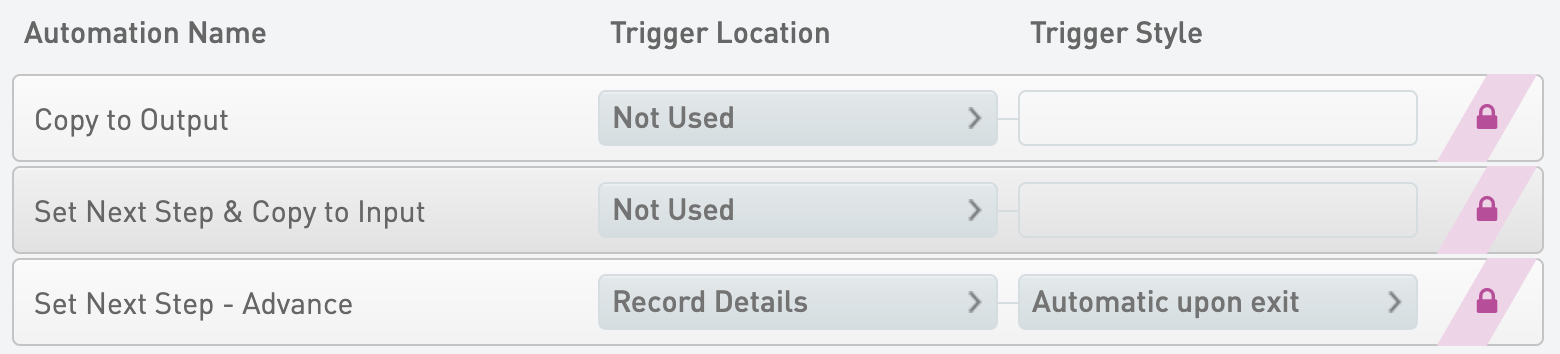
Set Next Step - Advance
* Trigger Location = Record Details
* Trigger Style = Automatic upon exit
{% code overflow="wrap" %}
```markup
bash -l -c "/opt/gls/clarity/bin/java -jar /opt/gls/clarity/extensions/ngs-common/v5/EPP/ngs-extensions.jar -i {stepURI:v2} -u {username} -p {password} \
script:evaluateDynamicExpression \
-t false \
-h false \
-exp 'nextStep = ::ADVANCE::' \
-log {compoundOutputFileLuid0}"
```
{% endcode %}
Copy to Output
* Trigger Location = Not Used
{% code overflow="wrap" %}
```markup
bash -l -c "/opt/gls/clarity/bin/java -jar /opt/gls/clarity/extensions/ngs-common/v5/EPP/ngs-extensions.jar -i {stepURI:v2} -u {username} -p {password} script:evaluateDynamicExpression -t false -h false -exp 'output.::Target Insert Size (bp):: = input.::Target Insert Size (bp)::' -log {compoundOutputFileLuid0}"
```
{% endcode %}
Set Next Step & Copy to Input
* Trigger Location = Not Used
{% code overflow="wrap" %}
```markup
bash -l -c "/opt/gls/clarity/bin/java -jar /opt/gls/clarity/extensions/ngs-common/v5/EPP/ngs-extensions.jar -i {stepURI:v2} -u {username} -p {password} script:evaluateDynamicExpression -t false -h false -exp 'nextStep = ::ADVANCE:: ; output.::Target Insert Size (bp):: = input.::Target Insert Size (bp)::' -log {compoundOutputFileLuid0}"
```
{% endcode %}
#### Queue/Ice Bucket
* Defaults
* Sample Grouping = Group by Containers
* Well Sort Order = Row
* Sample Table
* Column Headers
| **Category** | **Field Name** | **Field Type** | **Options** | **Additional Options and Dropdown Items** |
| -------------- | -------------- | -------------- | ----------- | ----------------------------------------- |
| Container | Container Name | Built-in | | |
| Container | Well | Built-in | | |
| Derived Sample | Sample Name | Built-in | | |
| Derived Sample | Waiting | Built-in | | |
* Expanded View Fields
| **Category** | **Field Name** | **Field Type** | **Options** | **Additional Options and Dropdown Items** |
| ------------ | ------------------- | -------------- | ----------- | ----------------------------------------- |
| Container | LIMS ID (Container) | Built-in | | |
| Project | Project Name | Built-in | | |
#### Add Labels
* Label Groups
* TruSeq ChIP
#### Record Details
* Step Data (Master Step Fields)
| **Field Name** | **Field Type** | **Options** | **Additional Options and Dropdown Items** |
| ------------------ | -------------- | ----------- | ----------------------------------------- |
| Comment | Multiline Text | | |
| 80% EtOH Prep Date | Date | | |
* Step File Placeholders
* Log File - Automatically attached
* Sample Table
* Sample Display Default = Expand
* Well Sort Order = Row
* Table Columns - Global Fields
| **Category** | **Field Name** | **Field Type** | **Options** | **Additional Options and Dropdown Items** |
| -------------- | ------------------- | -------------- | ----------- | ----------------------------------------- |
| Container | Container Name | Built-in | | |
| Container | LIMS ID (Container) | Built-in | | |
| Container | Well | Built-in | | |
| Derived Sample | Reagent Name | Built-in | | |
| Derived Sample | Sample Name | Built-in | | |
| Project | Project Name | Built-in | | |
### Step 5: Purify Ligation Products (TruSeq ChIP-Seq v1.0)
* Master Step Name = Purify Ligation Products (TruSeq ChIP-Seq v1.0)
* Step Type = Standard
* Derived Sample Generation = Fixed, 1
* Naming Convention = {SubmittedSampleName}
* Reagent Kits
* 6X gel loading dye
* Supplier = BioLabs
* Catalog Number = B7021S
* 50 bp DNA ladder
* Supplier = NEB
* Catalog Number = N3236L
* 50X TAE buffer
* Supplier = Bio-Rad
* Catalog Number = 161-0743
* 100bp DNA ladder
* Supplier = NEB
* Catalog Number = N3231L
* Certified low-range ultra agarose
* Supplier = Bio-Rad
* Catalog Number = 161-3107
* MinElute Gel Extraction Kit
* Supplier = QIAGEN, part # 28604
* Catalog Number = 28604
* SYBR Gold Nucleic acid gel stain
* Supplier = Invitrogen
* Catalog Number = S11494
* TruSeq ChIP Sample Prep Kit, Box A or B
* Supplier = Illumina
* Catalog Number = 15034288; 15034289
* Website =
#### Automations
Set Next Step - Advance
* Trigger Location = Record Details
* Trigger Style = Automatic upon exit
{% code overflow="wrap" %}
```markup
bash -l -c "/opt/gls/clarity/bin/java -jar /opt/gls/clarity/extensions/ngs-common/v5/EPP/ngs-extensions.jar -i {stepURI:v2} -u {username} -p {password} \
script:evaluateDynamicExpression \
-t false \
-h false \
-exp 'nextStep = ::ADVANCE::' \
-log {compoundOutputFileLuid0}"
```
{% endcode %}
#### Queue/Ice Bucket
* Defaults
* Sample Grouping = Group by Containers
* Well Sort Order = Row
* Sample Table
* Column Headers
| **Category** | **Field Name** | **Field Type** | **Options** | **Additional Options and Dropdown Items** |
| -------------- | -------------- | -------------- | ----------- | ----------------------------------------- |
| Container | Container Name | Built-in | | |
| Container | Well | Built-in | | |
| Derived Sample | Sample Name | Built-in | | |
| Derived Sample | Waiting | Built-in | | |
* Expanded View Fields
| **Category** | **Field Name** | **Field Type** | **Options** | **Additional Options and Dropdown Items** |
| ------------ | ------------------- | -------------- | ----------- | ----------------------------------------- |
| Container | LIMS ID (Container) | Built-in | | |
| Project | Project Name | Built-in | | |
#### Record Details
* Step Data (Master Step Fields)
| **Field Name** | **Field Type** | **Options** | **Additional Options and Dropdown Items** |
| -------------- | -------------- | ----------- | ----------------------------------------- |
| Comment | Multiline Text | | |
* Step File Placeholders
* Log File - Automatically attached
* Gel Image - Manually uploaded
* Sample Table
* Sample Display Default = Expand
* Well Sort Order = Row
* Table Columns - Global Fields
| **Category** | **Field Name** | **Field Type** | **Options** | **Additional Options and Dropdown Items** |
| -------------- | ------------------- | -------------- | ----------- | ----------------------------------------- |
| Container | Container Name | Built-in | | |
| Container | LIMS ID (Container) | Built-in | | |
| Container | Well | Built-in | | |
| Derived Sample | Sample Name | Built-in | | |
| Project | Project Name | Built-in | | |
### Step 6: Enrich DNA Fragments (TruSeq ChIP-Seq v1.0)
* Master Step Name = Enrich DNA Fragments (TruSeq ChIP-Seq v1.0)
* Step Type = Standard
* Derived Sample Generation = Fixed, 1
* Naming Convention = {SubmittedSampleName}
* Reagent Kits
* AMPure XP Beads
* Supplier = Beckman Coulter Genomics
* Catalog Number = A63881
* Website =
* TruSeq ChIP Sample Prep Kit, Box A or B
* Supplier = Illumina
* Catalog Number = 15034288; 15034289
* Website =
* TruSeq ChIP Sample Prep Kit, PCR Box
* Supplier = Illumina
* Catalog Number = 15027084
#### Automations
Set Next Step - Advance
* Trigger Location = Record Details
* Trigger Style = Automatic upon exit
{% code overflow="wrap" %}
```markup
bash -l -c "/opt/gls/clarity/bin/java -jar /opt/gls/clarity/extensions/ngs-common/v5/EPP/ngs-extensions.jar -i {stepURI:v2} -u {username} -p {password} \
script:evaluateDynamicExpression \
-t false \
-h false \
-exp 'nextStep = ::ADVANCE::' \
-log {compoundOutputFileLuid0}"
```
{% endcode %}
#### Queue/Ice Bucket
* Defaults
* Sample Grouping = Group by Containers
* Well Sort Order = Row
* Sample Table
* Column Headers
| **Category** | **Field Name** | **Field Type** | **Options** | **Additional Options and Dropdown Items** |
| -------------- | -------------- | -------------- | ----------- | ----------------------------------------- |
| Container | Container Name | Built-in | | |
| Container | Well | Built-in | | |
| Derived Sample | Sample Name | Built-in | | |
| Derived Sample | Waiting | Built-in | | |
* Expanded View Fields
| **Category** | **Field Name** | **Field Type** | **Options** | **Additional Options and Dropdown Items** |
| ------------ | ------------------- | -------------- | ----------- | ----------------------------------------- |
| Container | LIMS ID (Container) | Built-in | | |
| Project | Project Name | Built-in | | |
#### Record Details
* Step Data (Master Step Fields)
| **Field Name** | **Field Type** | **Options** | **Additional Options and Dropdown Items** |
| ---------------------- | -------------- | ----------- | ------------------------------------------------------------------- |
| Comment | Multiline Text | | |
| Number of PCR Cycles | Numeric | | Default = 18 Decimal Places Displayed = 0
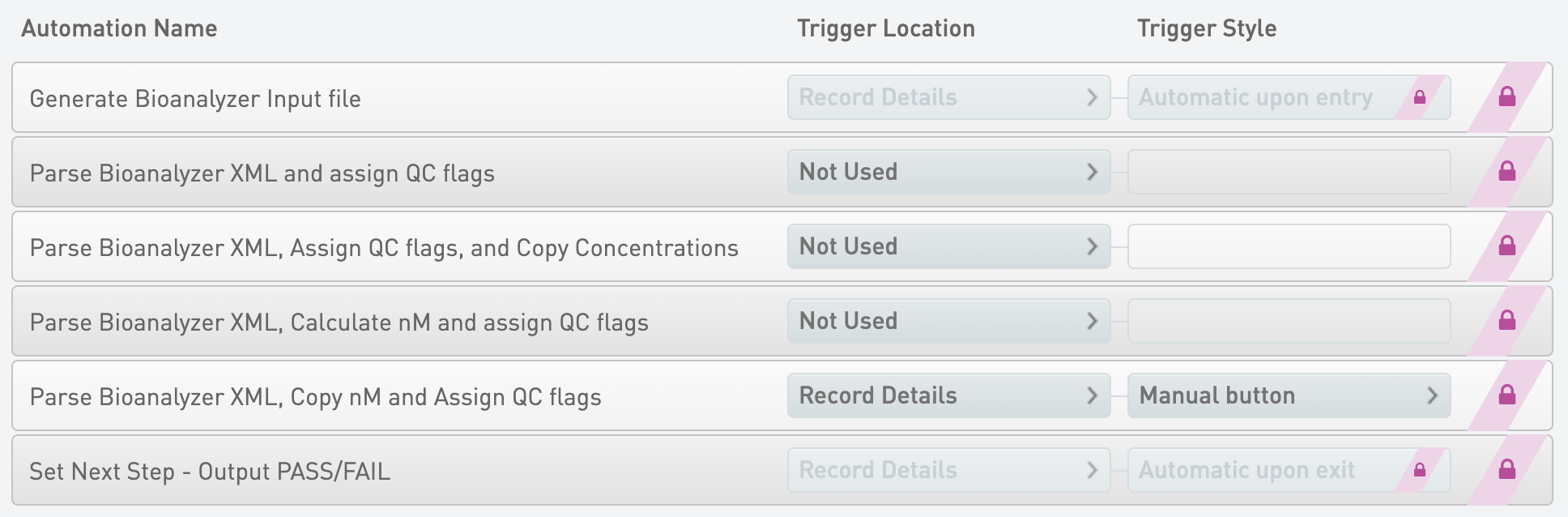
Generate Bioanalyzer Input file
* Trigger Location = Record Details
* Trigger Style = Automatic upon entry
{% code overflow="wrap" %}
```markup
bash -l -c "/opt/gls/clarity/bin/java -jar /opt/gls/clarity/extensions/ngs-common/v5/EPP/DriverFileGenerator.jar script:driver_file_generator -i {processURI:v2} -u {username} -p {password} -t /opt/gls/clarity/extensions/ngs-common/v5/EPP/conf/readonly/bioA_driver_file_template.csv -o {compoundOutputFileLuid0}.csv -l {compoundOutputFileLuid1} && /opt/gls/clarity/bin/java -jar /opt/gls/clarity/extensions/ngs-common/v5/EPP/ngs-extensions.jar script:addBlankLines -i {stepURI:v2} -u {username} -p {password} -f {compoundOutputFileLuid0}.csv -l {compoundOutputFileLuid1} -sep COMMA -b ',False,' -h 1 -c LIMSID -pre 'Sample '"
```
{% endcode %}
Parse Bioanalyzer XML, Copy nM and Assign QC flags
* Trigger Location = Record Details
* Trigger Style = Manual button
{% code overflow="wrap" %}
```markup
bash -l -c "/opt/gls/clarity/bin/java -jar /opt/gls/clarity/extensions/ngs-common/v5/EPP/ngs-extensions.jar -i {processURI:v2} -u {username} -p {password} script:parseBioAnalyzer -inputFile {compoundOutputFileLuid2} -log {compoundOutputFileLuid5} -configFile '/opt/gls/clarity/extensions/conf/v5/bioanalyzer/defaultBioAnalyzerDNAConfig.groovy' && /opt/gls/clarity/bin/java -jar /opt/gls/clarity/extensions/ngs-common/v5/EPP/ngs-extensions.jar -i {stepURI:v2} -u {username} -p {password} script:evaluateDynamicExpression -t true -h false -exp 'if (output.::Conc. Units::.contains(::pg::)) {output.::Molarity (nM):: = output.::Region 1 Molarity:: / 1000} else {output.::Molarity (nM):: = output.::Region 1 Molarity::} ; (input.::Molarity (nM):: = output.::Molarity (nM)::) ' -log {compoundOutputFileLuid8} && /opt/gls/clarity/bin/java -jar /opt/gls/clarity/extensions/ngs-common/v5/EPP/ngs-extensions.jar -i {processURI:v2} -u {username} -p {password} script:assignQC -log {compoundOutputFileLuid6} -qcResult {compoundOutputFileLuid7}"
```
{% endcode %}
Set Next Step - Output PASS/FAIL
* Trigger Location = Record Details
* Trigger Style = Automatic upon exit
{% code overflow="wrap" %}
```markup
bash -l -c "/opt/gls/clarity/bin/java -jar /opt/gls/clarity/extensions/ngs-common/v5/EPP/ngs-extensions.jar -i {stepURI:v2} -u {username} -p {password} script:evaluateDynamicExpression -t true -h false -excludeControls true -exp 'if (output.QC == true) { nextStep = ::ADVANCE:: } else { nextStep = ::ESCALATE:: }' -log {compoundOutputFileLuid0}"
```
{% endcode %}
Parse Bioanalyzer XML and assign QC flags
* Trigger Location = Not Used
{% code overflow="wrap" %}
```markup
bash -l -c "/opt/gls/clarity/bin/java -jar /opt/gls/clarity/extensions/ngs-common/v5/EPP/ngs-extensions.jar -i {processURI:v2} -u {username} -p {password} script:parseBioAnalyzer -inputFile {compoundOutputFileLuid2} -log {compoundOutputFileLuid5} -configFile '/opt/gls/clarity/extensions/conf/v5/bioanalyzer/defaultBioAnalyzerDNAConfig.groovy' script:assignQC -log {compoundOutputFileLuid6} -qcResult {compoundOutputFileLuid7}"
```
{% endcode %}
Parse Bioanalyzer XML, Assign QC flags, and Copy Concentrations
* Trigger Location = Not Used
{% code overflow="wrap" %}
```markup
bash -l -c "/opt/gls/clarity/bin/java -jar /opt/gls/clarity/extensions/ngs-common/v5/EPP/ngs-extensions.jar -i {processURI:v2} -u {username} -p {password} script:parseBioAnalyzer -inputFile {compoundOutputFileLuid2} -log {compoundOutputFileLuid5} -configFile '/opt/gls/clarity/extensions/conf/v5/bioanalyzer/defaultBioAnalyzerDNAConfig.groovy' script:assignQC -log {compoundOutputFileLuid6} -qcResult {compoundOutputFileLuid7} && /opt/gls/clarity/bin/java -jar /opt/gls/clarity/extensions/ngs-common/v5/EPP/ngs-extensions.jar -i {stepURI:v2} -u {username} -p {password} script:evaluateDynamicExpression -t true -h false -exp 'output.::Concentration:: = output.::Region 1 Conc.:: ; input.::Concentration:: = output.::Concentration:: ; output.::Conc. Units:: = ::ng/ul:: ; input.::Conc. Units:: = output.::Conc. Units::' -log {compoundOutputFileLuid8}"
```
{% endcode %}
Parse Bioanalyzer XML, Calculate nM and assign QC flags
* Trigger Location = Not Used
{% code overflow="wrap" %}
```markup
bash -l -c "/opt/gls/clarity/bin/java -jar /opt/gls/clarity/extensions/ngs-common/v5/EPP/ngs-extensions.jar -i {processURI:v2} -u {username} -p {password} script:parseBioAnalyzer -inputFile {compoundOutputFileLuid2} -log {compoundOutputFileLuid5} -configFile '/opt/gls/clarity/extensions/conf/v5/bioanalyzer/defaultBioAnalyzerDNAConfig.groovy' && /opt/gls/clarity/bin/java -jar /opt/gls/clarity/extensions/ngs-common/v5/EPP/ngs-extensions.jar -i {stepURI:v2} -u {username} -p {password} script:evaluateDynamicExpression -t true -h false -exp 'output.::Concentration:: = output.::Region 1 Conc.:: ; output.::Molarity (nM):: = (output.::Concentration:: * 1000000) / (660 * output.::Region 1 Average Size - bp::) ; input.::Molarity (nM):: = output.::Molarity (nM):: ; output.::Conc. Units:: = ::ng/ul::' -log {compoundOutputFileLuid8} && /opt/gls/clarity/bin/java -jar /opt/gls/clarity/extensions/ngs-common/v5/EPP/ngs-extensions.jar -i {processURI:v2} -u {username} -p {password} script:assignQC -log {compoundOutputFileLuid6} -qcResult {compoundOutputFileLuid7}"
```
{% endcode %}
#### Queue/Ice Bucket
* Defaults
* Sample Grouping = Group by Containers
* Well Sort Order = Row
* Sample Table (Column Headers)
| **Category** | **Field Name** | **Field Type** | **Options** | **Additional Options and Dropdown Items** |
| -------------- | ------------------- | -------------- | ----------- | ----------------------------------------- |
| Container | Container Name | Built-in | | |
| Container | LIMS ID (Container) | Built-in | | |
| Container | Well | Built-in | | |
| Derived Sample | Sample Name | Built-in | | |
| Derived Sample | Waiting | Built-in | | |
| Project | Project Name | Built-in | | |
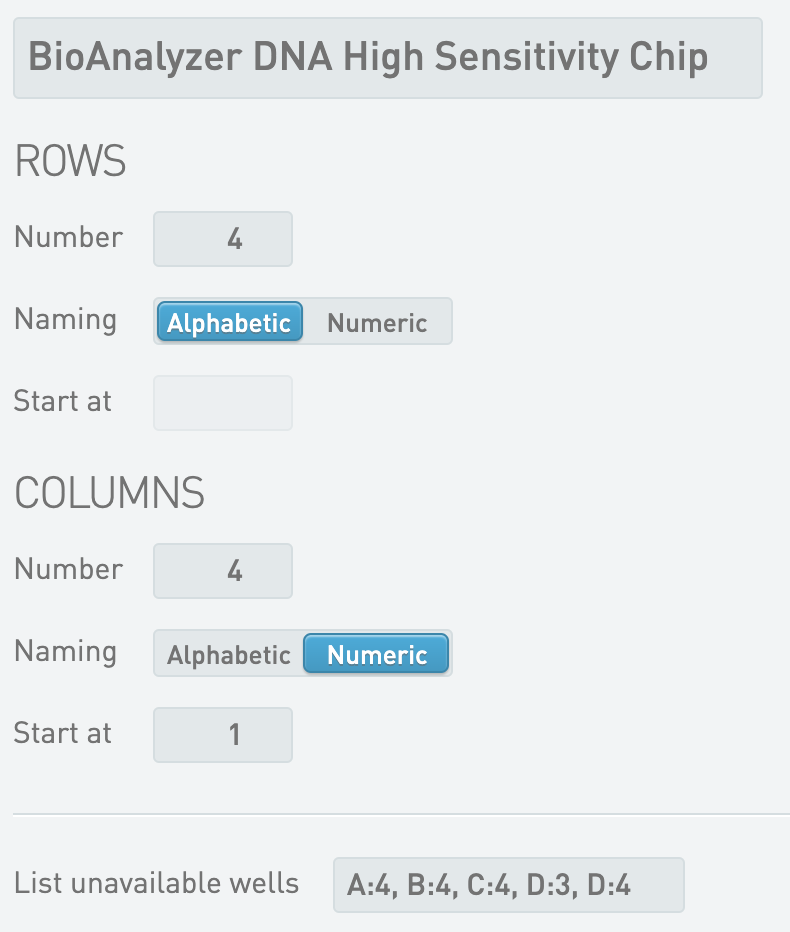
#### Placement = Enabled
* Defaults
* Sample Grouping = Group by Containers
* Well Sort Order = Column
* Placement Pattern = Column
* Destination Containers
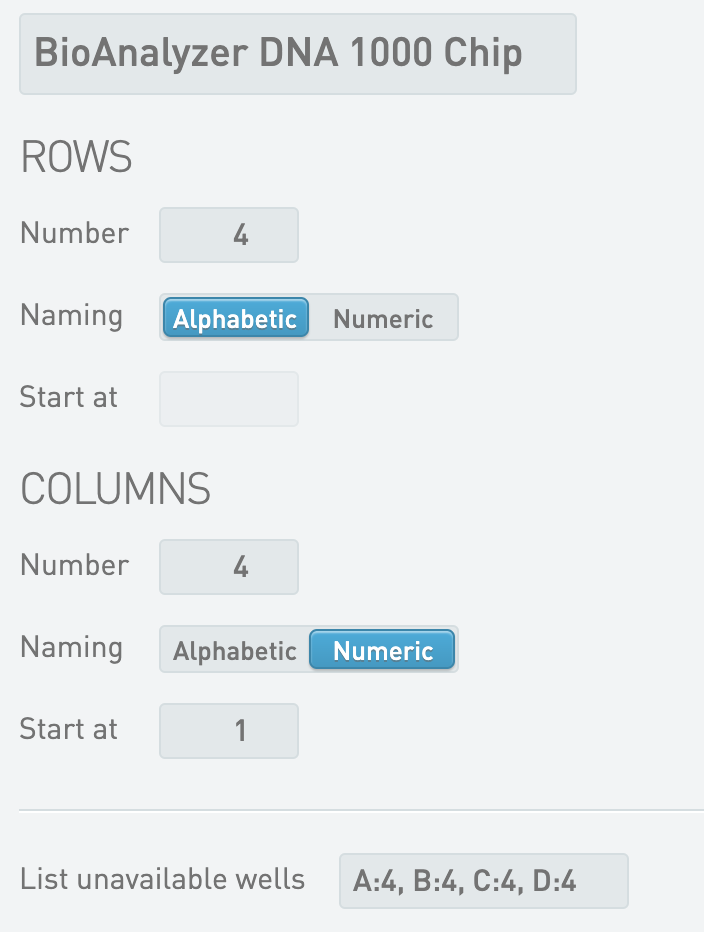
* BioAnalyzer DNA High Sensitivity Chip
Nextera DNA Flex Library Validation
* Criteria 1 - Operator = >=
* Criteria 1 - Source Data Field = Peak 2 Size - bp
* Criteria 1 - Threshold Value = 150.00
* Criteria 2 - Operator = <=
* Criteria 2 - Source Data Field = Peak 2 Size - bp
* Criteria 2 - Threshold Value = 1,500.00
Nextera Mate Pair Library Validation
* Criteria 1 - Operator = >=
* Criteria 1 - Source Data Field = Region 1 Average Size - bp
* Criteria 1 - Threshold Value = 150.00
* Criteria 2 - Operator = <=
* Criteria 2 - Source Data Field = Region 1 Average Size - bp
* Criteria 2 - Threshold Value = 400.00
Nextera XT DNA Library Validation
* Criteria 1 - Operator = >=
* Criteria 1 - Source Data Field = Peak 2 Size - bp
* Criteria 1 - Threshold Value = 250.00
* Criteria 2 - Operator = <=
* Criteria 2 - Source Data Field = Peak 2 Size - bp
* Criteria 2 - Threshold Value = 1,000.00
NRCC Library Validation
* Criteria 1 - Operator = >=
* Criteria 1 - Source Data Field = Peak 2 Size - bp
* Criteria 1 - Threshold Value = 350.00
* Criteria 2 - Operator = <=
* Criteria 2 - Source Data Field = Peak 2 Size - bp
* Criteria 2 - Threshold Value = 1,000.00
TruSeq ChIP-Seq Library Validation
* Criteria 1 - Operator = >=
* Criteria 1 - Source Data Field = Region 1 Average Size - bp
* Criteria 1 - Threshold Value = 150.00
* Criteria 2 - Operator = <=
* Criteria 2 - Source Data Field = Region 1 Average Size - bp
* Criteria 2 - Threshold Value = 400.00
TruSeq Exome Library Validation
* Criteria 1 - Operator = >=
* Criteria 1 - Source Data Field = Peak 2 Size - bp
* Criteria 1 - Threshold Value = 150.00
* Criteria 2 - Operator = <=
* Criteria 2 - Source Data Field = Peak 2 Size - bp
* Criteria 2 - Threshold Value = 1,000.00
TruSeq Methyl Capture EPIC Library Validation
* Criteria 1 - Operator = >=
* Criteria 1 - Source Data Field = Peak 2 Size - bp
* Criteria 1 - Threshold Value = 200.00
* Criteria 2 - Operator = <=
* Criteria 2 - Source Data Field = Peak 2 Size - bp
* Criteria 2 - Threshold Value = 300.00
TruSeq Rapid Exome Library Validation
* Criteria 1 - Operator = >=
* Criteria 1 - Source Data Field = Peak 2 Size - bp
* Criteria 1 - Threshold Value = 200.00
* Criteria 2 - Operator = <=
* Criteria 2 - Source Data Field = Peak 2 Size - bp
* Criteria 2 - Threshold Value = 500.00
TruSeq RNA Access Library Validation
* Criteria 1 - Operator = >=
* Criteria 1 - Source Data Field = Peak 2 Size - bp
* Criteria 1 - Threshold Value = 200.00
* Criteria 2 - Operator = <=
* Criteria 2 - Source Data Field = Peak 2 Size - bp
* Criteria 2 - Threshold Value = 320.00
TruSeq RNA Exome Library Validation
* Criteria 1 - Operator = >=
* Criteria 1 - Source Data Field = Peak 2 Size - bp
* Criteria 1 - Threshold Value = 200.00
* Criteria 2 - Operator = <=
* Criteria 2 - Source Data Field = Peak 2 Size - bp
* Criteria 2 - Threshold Value = 320.00
TruSeq Small RNA Library Validation
* Criteria 1 - Operator = >=
* Criteria 1 - Source Data Field = Region 1 Average Size - bp
* Criteria 1 - Threshold Value = 100.00
* Criteria 2 - Operator = <=
* Criteria 2 - Source Data Field = Region 1 Average Size - bp
* Criteria 2 - Threshold Value = 200.00
TruSeq Stranded mRNA Library Validation
* Criteria 1 - Operator = >=
* Criteria 1 - Source Data Field = Region 1 Average Size - bp
* Criteria 1 - Threshold Value = 250.00
* Criteria 2 - Operator = <=
* Criteria 2 - Source Data Field = Region 1 Average Size - bp
* Criteria 2 - Threshold Value = 275.00
TruSeq Stranded Total RNA Library Validation
* Criteria 1 - Operator = >=
* Criteria 1 - Source Data Field = Region 1 Average Size - bp
* Criteria 1 - Threshold Value = 250.00
* Criteria 2 - Operator = <=
* Criteria 2 - Source Data Field = Region 1 Average Size - bp
* Criteria 2 - Threshold Value = 275.00
TruSeq Targeted RNA Expression Library Validation
* Criteria 1 - Operator = >=
* Criteria 1 - Source Data Field = Peak 2 Size - bp
* Criteria 1 - Threshold Value = 100.00
* Criteria 2 - Operator = <=
* Criteria 2 - Source Data Field = Peak 2 Size - bp
* Criteria 2 - Threshold Value = 300.00
TruSight Myeloid Library Validation
* Criteria 1 - Operator = >=
* Criteria 1 - Source Data Field = Region 1 Average Size - bp
* Criteria 1 - Threshold Value = 150.00
* Criteria 2 - Operator = <=
* Criteria 2 - Source Data Field = Region 1 Size - bp
* Criteria 2 - Threshold Value = 400.00
TruSight RNA Fusion Library Validation
* Criteria 1 - Operator = >=
* Criteria 1 - Source Data Field = Region 1 Average Size - bp
* Criteria 1 - Threshold Value = 160.00
* Criteria 2 - Operator = <=
* Criteria 2 - Source Data Field = Region 1 Size - bp
* Criteria 2 - Threshold Value = 700.00
TSCA Library Validation
* Criteria 1 - Operator = >=
* Criteria 1 - Source Data Field = Region 1 Average Size - bp
* Criteria 1 - Threshold Value = 300.00
* Criteria 2 - Operator = <=
* Criteria 2 - Source Data Field = Region 1 Size - bp
* Criteria 2 - Threshold Value = 400.00
* Step Data
* Group of Defaults = TruSeq ChIP-Seq Library Validation
* Master Step Fields
| **Field Name** | **Field Type** | **Options** | **Additional Options and Dropdown Items** |
| ------------------------------------------- | -------------- | -------------- | --------------------------------------------------------------------------------------------------------------------------------------------------------------------------------------------------------------------------------------------------------------------------------------------------------------------------------------------------------------------------------------------------------------------------------------------------------------------------------------------------------------------------------------------------------------------------------------------------------------------------------------------------------------------------------------------------------------------------------------------------------------------------------------------------------------------------------------------------------------------------------------------------------------------------------- |
| Criteria 1 - Operator | Text Dropdown | Custom Entries | Presets
|
| Criteria 1 - Source Data Field | Text Dropdown | | Presets
Concentration Conc. Units Number of Peaks found Peak 1 Size - bp Peak 1 Conc. Peak 1 Molarity Peak 2 Size - bp Peak 2 Conc. Peak 2 Molarity Peak 3 Size - bp Peak 3 Conc. Peak 3 Molarity Peak 4 Size - bp Peak 4 Conc. Peak 4 Molarity Peak 5 Size - bp Peak 5 Conc. Peak 5 Molarity Number of Regions found Region 1 Average Size - bp Region 1 Conc. Region 1 Molarity Region 2 Average Size - bp Region 2 Conc. Region 2 Molarity Region 3 Average Size - bp Region 3 Conc. Region 3 Molarity Region 4 Average Size - bp Region 4 Conc. Region 4 Molarity Region 5 Average Size - bp Region 5 Conc. Region 5 Molarity Presets
|
| Criteria 2 - Source Data Field | Text Dropdown | | Presets
Concentration Conc. Units Number of Peaks found Peak 1 Size - bp Peak 1 Conc. Peak 1 Molarity Peak 2 Size - bp Peak 2 Conc. Peak 2 Molarity Peak 3 Size - bp Peak 3 Conc. Peak 3 Molarity Peak 4 Size - bp Peak 4 Conc. Peak 4 Molarity Peak 5 Size - bp Peak 5 Conc. Peak 5 Molarity Number of Regions found Region 1 Average Size - bp Region 1 Conc. Region 1 Molarity Region 2 Average Size - bp Region 2 Conc. Region 2 Molarity Region 3 Average Size - bp Region 3 Conc. Region 3 Molarity Region 4 Average Size - bp Region 4 Conc. Region 4 Molarity Region 5 Average Size - bp Region 5 Conc. Region 5 Molarity
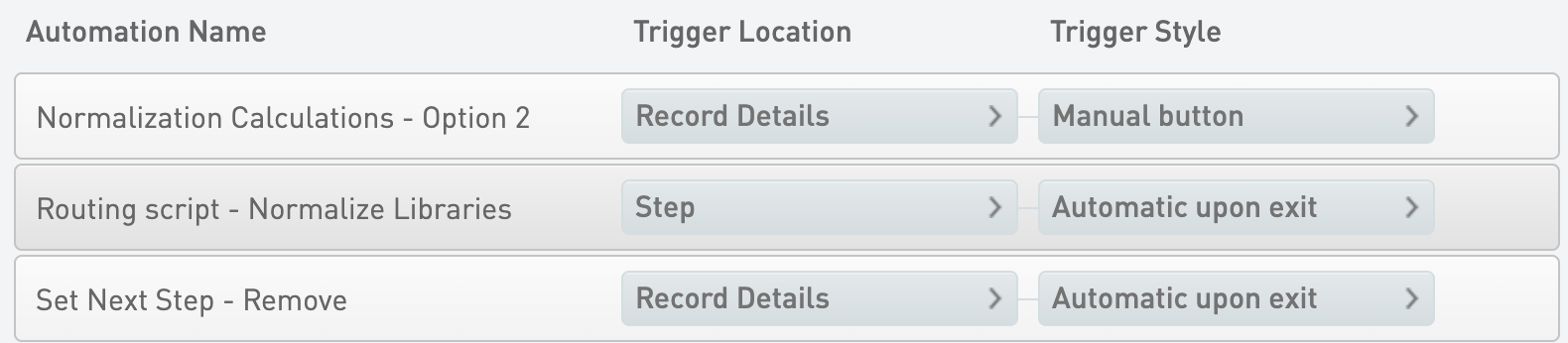
Normalization Calculations - Option 2
* Trigger Location = Record Details
* Trigger Style = Manual button
{% code overflow="wrap" %}
```markup
bash -l -c "/opt/gls/clarity/bin/java -jar /opt/gls/clarity/extensions/ngs-common/v5/EPP/ngs-extensions.jar -i {stepURI:v2:http} -u {username} -p {password} script:evaluateDynamicExpression -t true -h false -exp 'output.::Molarity (nM):: = input.::Molarity (nM):: ; if (output.::Molarity (nM):: <= step.::Target Normalization (nM)::) {output.::Sample Volume (ul):: = step.::Sample Volume (ul):: ; output.::Buffer Volume (ul):: = 0 ; output.::Normalized Molarity (nM):: = output.::Molarity (nM)::} else {output.::Sample Volume (ul):: = step.::Sample Volume (ul):: ; output.::Buffer Volume (ul):: = ((output.::Molarity (nM):: * step.::Sample Volume (ul)::) / step.::Target Normalization (nM)::) - step.::Sample Volume (ul):: ; output.::Normalized Molarity (nM):: = step.::Target Normalization (nM)::}' -log {compoundOutputFileLuid0}"
```
{% endcode %}
Set Next Step - Remove
* Trigger Location = Record Details
* Trigger Style = Automatic upon exit
{% code overflow="wrap" %}
```markup
bash -l -c "/opt/gls/clarity/bin/java -jar /opt/gls/clarity/extensions/ngs-common/v5/EPP/ngs-extensions.jar -i {stepURI:v2} -u {username} -p {password} script:evaluateDynamicExpression -t false -h false -exp 'nextStep = ::REMOVE::' -log {compoundOutputFileLuid0}"
```
{% endcode %}
Routing script - Normalize Libraries
* Trigger Location = Step
* Trigger Style = Automatic upon exit
{% code overflow="wrap" %}
```markup
bash -c "/opt/gls/clarity/bin/java -jar /opt/gls/clarity/extensions/ngs-common/v5/EPP/ngs-extensions.jar -u {username} -p {password} -i {stepURI:v2} -l {compoundOutputFileLuid0} script:changeWorkflow \
\
--FIELD_NAME 'Sequencing Instrument' \
--FIELD_VALUE 'MiSeq' \
--WORKFLOW 'MiSeq Sequencing v3.2' \
--STEP 'Library Pooling (MiSeq v3.2)' \
--INPUTS_OR_OUTPUTS 'OUTPUTS' \
\
--FIELD_NAME 'Sequencing Instrument' \
--FIELD_VALUE 'NextSeq' \
--WORKFLOW 'NextSeq 500/550 Sequencing v1.2' \
--STEP 'Library Pooling (NextSeq 500/550 v1.2)' \
--INPUTS_OR_OUTPUTS 'OUTPUTS' \
\
--FIELD_NAME 'Sequencing Instrument' \
--FIELD_VALUE 'NovaSeq 2.0' \
--WORKFLOW 'NovaSeq 6000 v2.3' \
--STEP 'Define Run Format (NovaSeq 6000 v2.3)' \
--INPUTS_OR_OUTPUTS 'OUTPUTS' \
\
--FIELD_NAME 'Sequencing Instrument' \
--FIELD_VALUE 'NovaSeq 3.0' \
--WORKFLOW 'NovaSeq 6000 v3.8' \
--STEP 'Define Run Format (NovaSeq 6000 v3.8)' \
--INPUTS_OR_OUTPUTS 'OUTPUTS' \
\
--FIELD_NAME 'Sequencing Instrument' \
--FIELD_VALUE 'NovaSeqDx' \
--WORKFLOW 'NovaSeqDx v1.2' \
--STEP 'Define Run Format (NovaSeqDx v1.2)' \
--INPUTS_OR_OUTPUTS 'OUTPUTS' \
\
--FIELD_NAME 'Sequencing Instrument' \
--FIELD_VALUE 'NextSeq 1000/2000' \
--WORKFLOW 'NextSeq 1000/2000 Sequencing v2.4' \
--STEP 'Library Pooling and Dilution (NextSeq 1000/2000 Sequencing v2.4)' \
--INPUTS_OR_OUTPUTS 'OUTPUTS' \
\
--FIELD_NAME 'Sequencing Instrument' \
--FIELD_VALUE 'NovaSeq X Series' \
--WORKFLOW 'NovaSeq X Series v1.1' \
--STEP 'Assign Analysis Configuration Template (NovaSeq X Series Sequencing v1.1)' \
--INPUTS_OR_OUTPUTS 'OUTPUTS' \
\
--FIELD_NAME 'Sequencing Instrument' \
--FIELD_VALUE 'NextSeq 1000/2000 On-Prem' \
--WORKFLOW 'NextSeq 1000/2000 On-Prem Sequencing v1.0' \
--STEP 'Library Pooling and Dilution (NextSeq 1000/2000 On-Prem Sequencing v1.0)' \
--INPUTS_OR_OUTPUTS 'OUTPUTS'"
```
{% endcode %}
> ℹ The field value and the actual version of the workflows and steps in the routing automation script may be different depending on the version of IPP installed.
#### Queue/Ice Bucket
* Defaults
* Sample Grouping = Group by Containers
* Well Sort Order = Row
* Sample Table
* Column Headers
| **Category** | **Field Name** | **Field Type** | **Options** | **Additional Options and Dropdown Items** |
| -------------- | -------------- | -------------- | ----------- | ----------------------------------------- |
| Container | Container Name | Built-in | | |
| Container | Well | Built-in | | |
| Derived Sample | Sample Name | Built-in | | |
| Derived Sample | Waiting | Built-in | | |
* Expanded View Fields
| **Category** | **Field Name** | **Field Type** | **Options** | **Additional Options and Dropdown Items** |
| ------------ | ------------------- | -------------- | ----------- | ----------------------------------------- |
| Container | LIMS ID (Container) | Built-in | | |
| Project | Project Name | Built-in | | |
#### Record Details
* Step Data (Master Step Fields)
| **Field Name** | **Field Type** | **Options** | **Additional Options and Dropdown Items** |
| ------------------------- | -------------- | -------------- | ------------------------------------------------------------------- |
| Comment | Multiline Text | | |
| Sample Volume (ul) | Numeric | Required Field | Default = 10 Decimal Places Displayed = 0 Default = 10 Decimal Places Displayed = 0 Presets
MiSeq NextSeq NextSeq 1000/2000 NextSeq 1000/2000 On-Prem NovaSeq 2.0 NovaSeq 3.0 NovaSeq X Series NovaSeqDx &goal=
```
`ask` is the immediate question: it should be specific, self-contained, and written in natural language.
`goal` is what the user is ultimately trying to achieve, the reason they need the answer. Sharing it helps GitBook give you a better, more relevant answer. A goal is most helpful when it describes the outcome the user wants rather than restating the question. For example, with `ask=how do I create an API token`, a goal like `automate deployments from our CI pipeline` lets GitBook tailor the answer to that use case.
The response will contain a direct answer to the question and relevant excerpts and sources from the documentation.
Use this mechanism when the answer is not explicitly present in the current page, you need clarification or additional context, or you want to retrieve related documentation sections.